wlxBWAOsig
Download script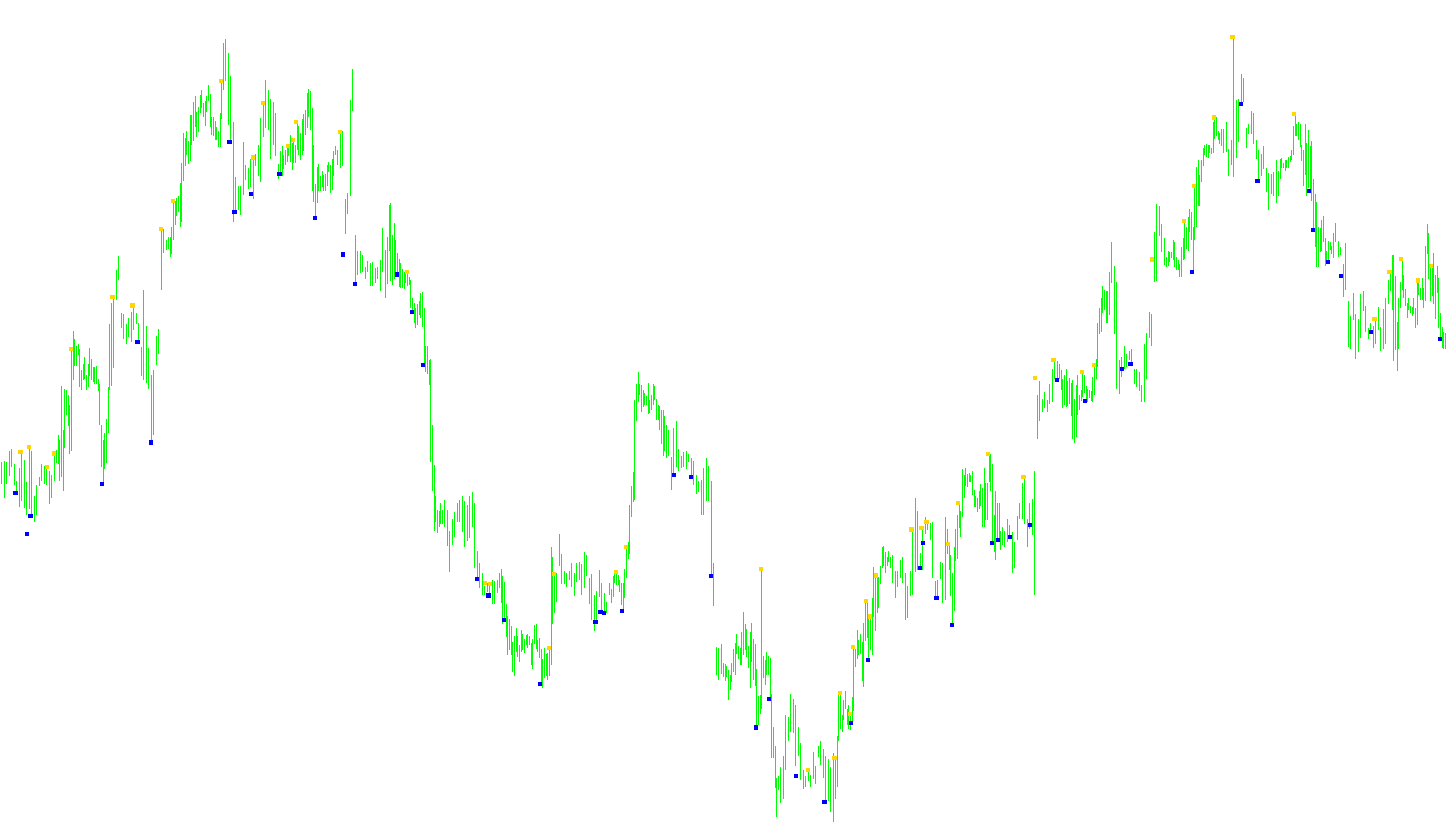
This tool is designed as a visual aid for traders to identify specific momentum shifts and trend reversals on a price chart. Rather than displaying a continuous line, it focuses on highlighting key moments where the "Awesome Oscillator" (a momentum indicator) provides significant signals.
How the Logic Works
The script scans historical price data and calculates the momentum of the market by looking at the Awesome Oscillator values across three consecutive points in time. It then looks for specific mathematical conditions to trigger visual markers (arrows) on your chart:
1. Trend Continuation Signals The tool identifies periods where the market is moving strongly in one direction. If the momentum is consistently positive and increasing, or consistently negative and decreasing, it places a marker to acknowledge the prevailing trend strength.
2. Momentum Reversals (Cross-overs) One of the primary functions of this script is to detect when momentum switches from negative to positive (or vice versa). When the indicator crosses the zero line, it signals a potential shift in market sentiment, and the tool places an arrow at the high or low of that specific candle.
3. Peak Identification (Turning Points) The logic includes a more sophisticated "Peak" detection system. It looks for instances where the momentum was moving strongly in one direction but suddenly begins to decelerate or curve back toward the zero line.
- If the momentum is positive but starts dropping significantly, it flags a potential "top."
- If the momentum is negative but starts rising significantly, it flags a potential "bottom."
The script tracks these peaks dynamically, ensuring that it only highlights significant turning points by comparing current values against previous highs and lows in the momentum cycle.
Visual Output
To keep the chart clean for the user, the script does not clutter the screen with constant data. Instead, it places two distinct types of markers:
- Upward Markers: These appear above the high of a candle when the logic detects a bullish shift or a significant upward momentum surge.
- Downward Markers: These appear below the low of a candle when the logic detects a bearish shift or a significant downward momentum surge.
In summary, this tool acts as a filter, distilling complex momentum movements into clear visual cues that help a trader see where the market is gaining strength, losing steam, or potentially reversing direction.
//+------------------------------------------------------------------+
//|                                                   wlxBWAOsig.mq4 |
//|                        Copyright © 2005 B.Williams, coding wellx |
//|                                        http://www.metaquotes.net |
//+------------------------------------------------------------------+
#property copyright "Copyright © 2005 B.Williams, Degtyarev V, coding wellx"
#property link      "http://www.metaquotes.net"

#property indicator_chart_window
#property indicator_buffers 2
#property indicator_color1 Yellow
#property indicator_color2 OrangeRed

extern int  updown=5;
//---- buffers
double BWAOup[];
double BWAOdown[];

int pos=0;
double AO,AO1,AO2;
double TPicksUP=0.0, TPicksDown=0.0;
//+------------------------------------------------------------------+
//| Custom indicator initialization function                         |
//+------------------------------------------------------------------+
int init()
  {
//---- indicators
   SetIndexStyle(0,DRAW_ARROW);
   SetIndexArrow(0,167);
   SetIndexBuffer(0,BWAOup);
   SetIndexEmptyValue(0,0.0);

   SetIndexStyle(1,DRAW_ARROW);
   SetIndexArrow(1,167);
   SetIndexBuffer(1,BWAOdown);
   SetIndexEmptyValue(1,0.0);

   IndicatorDigits(6);
//----
   return(0);
  }
//+------------------------------------------------------------------+
//| Custor indicator deinitialization function                       |
//+------------------------------------------------------------------+
int deinit()
  {
//---- TODO: add your code here

//----
   return(0);
  }
//+------------------------------------------------------------------+
//| Custom indicator iteration function                              |
//+------------------------------------------------------------------+
int start()
  {
   int  cbars=IndicatorCounted();
   if  (cbars<0) return(-1);
   if  (cbars>0) cbars--;

//---- TODO: add your code here
   if (cbars > (Bars-40)) pos=(Bars-40);
   else pos=cbars;
//   pos=10;
   while (pos > 0)
   {
    BWAOup[pos]=NULL;
    BWAOdown[pos]=NULL;
    AO=iAO(NULL,0,pos);
    AO1=iAO(NULL,0,pos+1);
    AO2=iAO(NULL,0,pos+2);

    if ((AO2>0.0 && AO1>0.0 && AO>0.0) && (AO2>AO1 && AO>AO1)) BWAOup[pos]=(High[pos]+updown*Point);
    if (AO1<0.0 && AO>0.0) BWAOup[pos]=(High[pos]+updown*Point);

    if ((AO2<0.0 && AO1<0.0 && AO<0.0) && (AO2<AO1 && AO<AO1)) BWAOdown[pos]=(Low[pos]-updown*Point);
    if (AO1>0.0 && AO<0.0) BWAOdown[pos]=(Low[pos]-updown*Point);

    if (AO>0.0 && TPicksUP!=0.0) TPicksUP=0.0;
    if (AO<0.0 && TPicksDown!=0.0) TPicksDown=0.0;

    if ((AO2<0.0 && AO1<0.0 && AO < 0.0) && (AO2>AO1 && AO>AO1)) {
       if (AO1>TPicksUP) BWAOup[pos]=(High[pos]+updown*Point);
       TPicksUP=AO1;
    }
    if ((AO2>0.0 && AO1>0.0 && AO > 0.0) && (AO2<AO1 && AO<AO1)) {
       if (AO1<TPicksDown) BWAOdown[pos]=(Low[pos]-updown*Point);
       TPicksDown=AO1;
    }

    pos--;
   }


//----
   return(0);
  }
//+------------------------------------------------------------------+
Comments