Kaufman_v2
Download script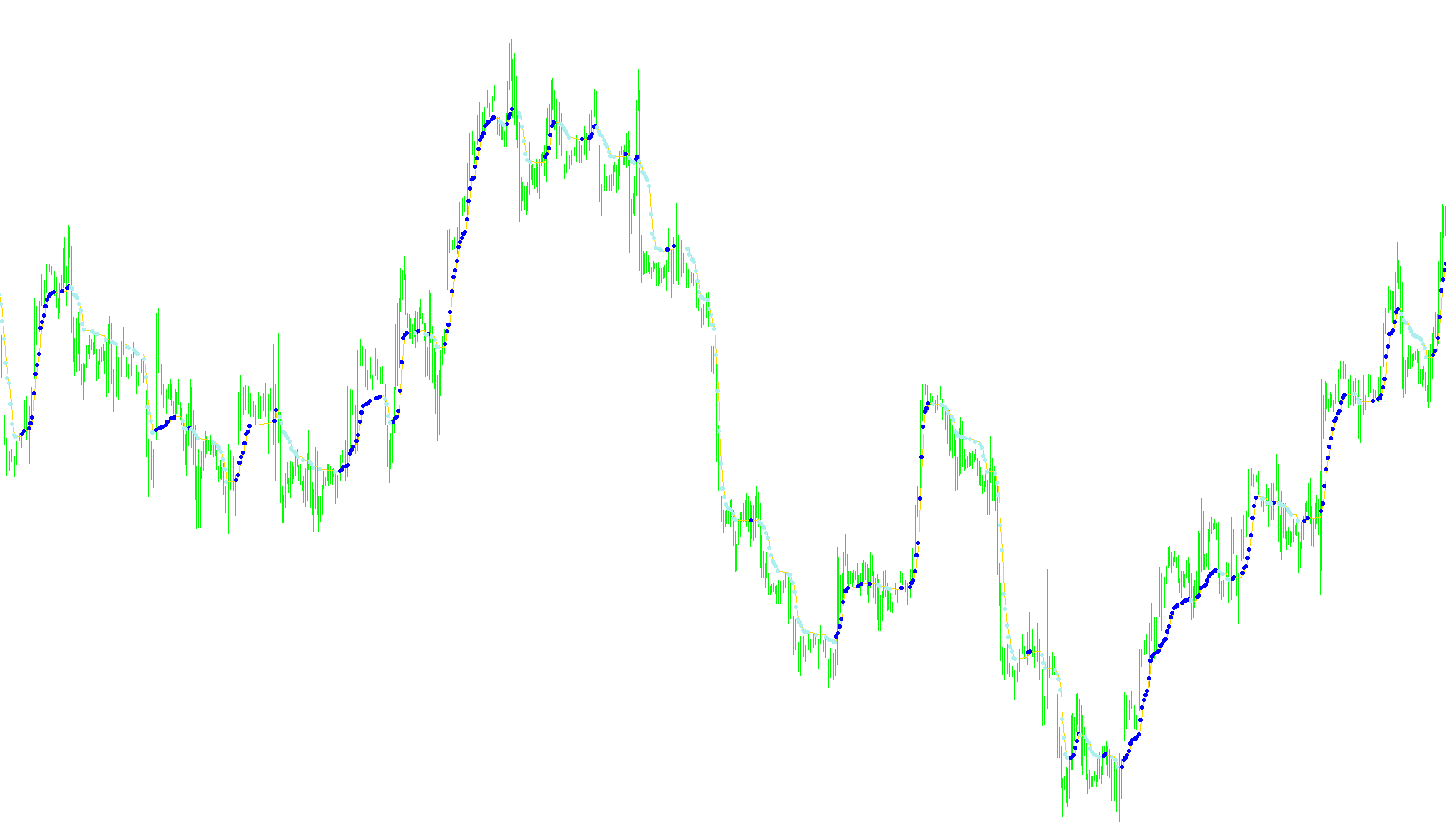
This trading tool is designed to help traders navigate market movements by smoothing out price fluctuations and identifying clear directional trends. It functions primarily by calculating a sophisticated moving average that adapts to the "noise" of the market, making it more responsive during strong trends and more stable during consolidation periods.
Core Functionality: Trend Smoothing
The primary logic of the script revolves around an Adaptive Moving Average (AMA). Unlike standard moving averages that treat all price data equally, this tool evaluates the efficiency of the current price movement. It compares the total price change over a specific period against the sum of all individual price changes within that same timeframe.
By calculating this "efficiency ratio," the tool can distinguish between:
- Trending Markets: Where price moves consistently in one direction (high efficiency).
- choppy/Sideways Markets: Where price fluctuates wildly without net progress (low efficiency).
Based on these conditions, the indicator automatically adjusts its sensitivity. In a steady trend, it follows the price closely; in a noisy, erratic market, it flattens out to prevent "fake-outs" and unnecessary signals.
Visual Signals and Alerts
Beyond just drawing a smoothed line on your chart, the script provides specific visual cues to help identify potential entry or exit points:
- Trend Line: A primary line that tracks the smoothed price action, providing a clear visual of the current market momentum.
- Upward Signals: The tool looks for significant positive movements in the moving average. If the change exceeds a predefined threshold (the "K" factor), it places an upward arrow on the chart. This suggests that the momentum is strengthening to the upside.
- Downward Signals: Conversely, if the moving average drops significantly below a certain threshold, a downward arrow appears. This indicates a potential shift toward bearish momentum.
Key Parameters for Customization
The tool allows users to fine-tune its behavior through several variables:
- Period Settings: Users can define the timeframe over which the "noise" and trends are measured.
- Fast/Slow Coefficients: These determine how quickly the indicator reacts to new price changes versus how much it respects historical data.
- Sensitivity Threshold (dK): This controls the minimum distance a price move must travel before a signal arrow is actually displayed, helping users filter out minor vibrations in the market.
/*-----------------------------+
|			       |
| Shared by www.Aptrafx.com    |
|			       |
+------------------------------*/

//+------------------------------------------------------------------+
//|                                                      Kaufman.mq4 |
//|                             Copyright © -2005, by konKop & wellx |
//|                                        http://www.metaquotes.net |
//+------------------------------------------------------------------+
#property copyright "Copyright © 2004, by konKop,wellx"
#property link      "http://www.metaquotes.net"

#property indicator_chart_window
#property indicator_buffers 3
#property indicator_color1 Sienna
#property indicator_color2 DeepSkyBlue
#property indicator_color3 Gold

//---- input parameters
extern int       periodAMA=9;
extern int       nfast=2;
extern int       nslow=30;
extern double    G=2.0;
extern double    dK=2.0;

//---- buffers
double kAMAbuffer[];
double kAMAupsig[];
double kAMAdownsig[];

//+------------------------------------------------------------------+

int    k=0, cbars=0, prevbars=0, prevtime=0;

double slowSC,fastSC;

//+------------------------------------------------------------------+
//| Custom indicator initialization function                         |
//+------------------------------------------------------------------+
int init()
  {
//---- indicators
   SetIndexStyle(0,DRAW_LINE);
   SetIndexStyle(1,DRAW_ARROW);
   SetIndexArrow(1,159);
   SetIndexStyle(2,DRAW_ARROW);
   SetIndexArrow(2,159);
   //SetIndexDrawBegin(0,nslow+nfast);
   SetIndexBuffer(0,kAMAbuffer);
   SetIndexBuffer(1,kAMAupsig);
   SetIndexBuffer(2,kAMAdownsig);


   IndicatorDigits(4);

//----
   return(0);
  }
//+------------------------------------------------------------------+
//| Custom indicator deinitialization function                       |
//+------------------------------------------------------------------+
int deinit()
  {
   return(0);
  }
//+------------------------------------------------------------------+
//| Custom indicator iteration function                              |
//+------------------------------------------------------------------+
int start()
  {
   int    i,pos=0;
   double noise=0.000000001,AMA,AMA0,signal,ER;
   double dSC,ERSC,SSC,ddK;

   if (prevbars==Bars) return(0);

//---- TODO: add your code here
   slowSC=(2.0 /(nslow+1));
   fastSC=(2.0 /(nfast+1));
   cbars=IndicatorCounted();
   if (Bars<=(periodAMA+2)) return(0);
//---- check for possible errors
   if (cbars<0) return(-1);
//---- last counted bar will be recounted
   if (cbars>0) cbars--;
   pos=Bars-periodAMA-2;
   AMA0=Close[pos+1];
   while (pos>=0)
     {
      kAMAupsig[pos]  =NULL;
      kAMAdownsig[pos]=NULL;
      if(pos==Bars-periodAMA-2) AMA0=Close[pos+1];
      signal=MathAbs(Close[pos]-Close[pos+periodAMA]);
      noise=0.000000001;
      for(i=0;i<periodAMA;i++)
       {
        noise=noise+MathAbs(Close[pos+i]-Close[pos+i+1]);
       };
      ER =signal/noise;
      dSC=(fastSC-slowSC);
      ERSC=ER*dSC;
      SSC=ERSC+slowSC;
      AMA=AMA0+(MathPow(SSC,G)*(Close[pos]-AMA0));
      kAMAbuffer[pos]=AMA;

      ddK=(AMA-AMA0);
      if ((MathAbs(ddK) > (dK*Point)) && (ddK > 0))  kAMAupsig[pos]  =AMA;
      if ((MathAbs(ddK)) > (dK*Point) && (ddK < 0))  kAMAdownsig[pos]=AMA;

      AMA0=AMA;
      pos--;
     };
//----
   prevbars=Bars;
   return(0);
  }
Comments