StepMA_v7.1
Download script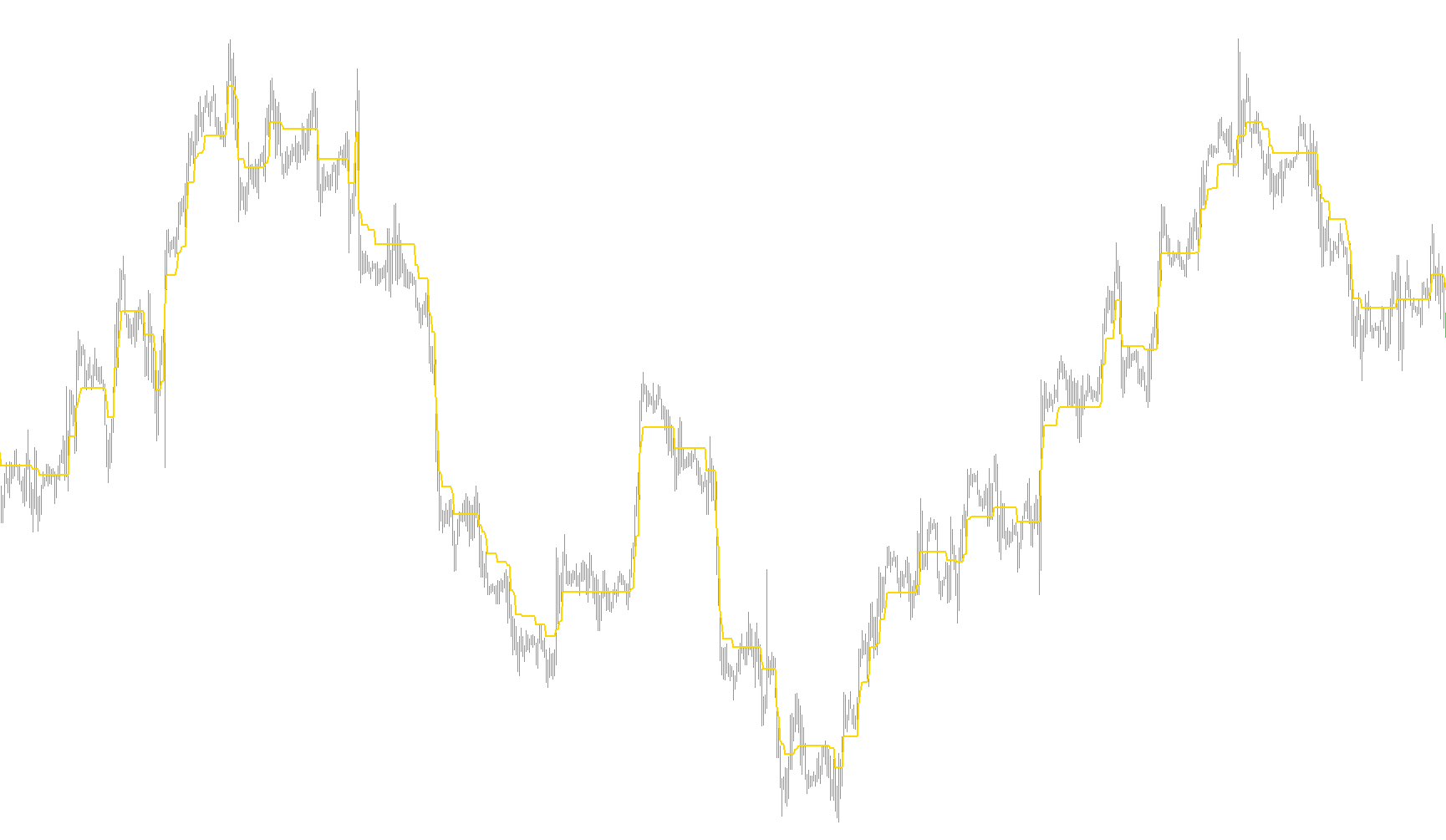
Overview of the StepMA Indicator Logic
The StepMA is a specialized technical analysis tool designed to track price trends by moving in distinct, "stepped" increments rather than a smooth curve. Unlike standard moving averages that recalculate constantly based on every price tick, this indicator identifies structural shifts in the market and moves only when specific price thresholds are breached. This creates a staircase-like visual effect that helps traders distinguish between minor market noise and significant trend changes.
Core Mechanics
The logic of the script can be broken down into three primary stages:
1. Dynamic Step Size Calculation
Before determining where the line moves, the script must decide "how far" it is allowed to move. It calculates a Step Size using two different methods depending on user preference:
- Automatic Volatility Mode: The script analyzes a specific look-back period of price data to determine the average range (volatility). It identifies the highest and lowest volatility points within that window and uses them to calculate a proportional step. This allows the indicator to adapt automatically; in high-volatility markets, the "steps" become larger, and in quiet markets, the steps become smaller.
- Manual Fixed Mode: The user can provide a constant value, forcing the indicator to move by a rigid, predefined amount regardless of market conditions.
2. Trend Detection and Thresholds
The indicator maintains an internal memory of the current trend (Upward or Downward). It establishes "boundary zones" based on the calculated Step Size:
- Boundary Creation: Depending on the settings, it looks at either the High/Low prices or the Closing prices to create a buffer zone above and below the current line.
- Breakout Logic: The trend only flips when the price closes completely outside of these boundaries. For example, for an upward trend to be confirmed, the price must break above the upper boundary. Once broken, the indicator "locks" into that new direction.
3. Step Movement Execution
Once a trend is established, the indicator follows these rules:
- Resistance/Support Locking: While in an upward trend, the indicator moves up only by one fixed step at a time. It ignores any price movement that doesn't reach the next calculated level, effectively "holding its ground" against minor pullbacks.
- Visual Representation: The script provides several ways to display this logic on the chart:
- A continuous line showing the stepped progression.
- Specific "Up" and "Down" signals based on the trend direction.
- Color-coded modes that highlight whether the current momentum is bullish or bearish.
Summary of Behavior
In essence, this script acts as a filter for market noise. By requiring the price to clear a specific "step" of volatility before the indicator moves, it prevents the line from reacting to every small fluctuation. It seeks to provide a clearer picture of the underlying trend by only updating its position when the market demonstrates enough strength to overcome the predefined step distance.
//+------------------------------------------------------------------+
//|                                                  StepMA_v7.1.mq4 |
//|                                Copyright © 2006, TrendLaboratory |
//|            http://finance.groups.yahoo.com/group/TrendLaboratory |
//|                                   E-mail: igorad2003@yahoo.co.uk |
//+------------------------------------------------------------------+
#property copyright "Copyright © 2006, TrendLaboratory"
#property link      "http://finance.groups.yahoo.com/group/TrendLaboratory"

#property indicator_chart_window
#property indicator_buffers 3
#property indicator_color1 Aqua
#property indicator_color2 Blue
#property indicator_color3 Red

//---- input parameters
extern int     Length      = 10;      // Volty Length
extern double  Kv          = 1.0;     // Sensivity Factor
extern int     StepSize    = 0;       // Constant Step Size (if need)
extern int     MA_Mode     = 0;       // Volty MA Mode : 0-SMA, 1-LWMA
extern int     Advance     = 0;       // Offset
extern double  Percentage  = 0;       // Percentage of Up/Down Moving
extern bool    HighLow     = false;   // High/Low Mode Switch (more sensitive)
extern int     ColorMode   = 0;       // Color Mode Switch
extern int     BarsNumber  = 0;

//---- indicator buffers
double LineBuffer[];
double UpBuffer[];
double DnBuffer[];
double smin[];
double smax[];
double trend[];

double StepMA=0, ATR0=0,ATRmax=-100000,ATRmin=1000000;
int limit;

//---- StepSize Calculation

   double StepSizeCalc ( int Len, double Km, int Size, int k)
   {

   double result;
   if( Size==0 )
   {
        double AvgRange=0;
	     double Weight = 0;
	     for (int i=Len-1;i>=0;i--)
	     {
            if(MA_Mode==0) double alfa= 1.0; else alfa= 1.0*(Len-i)/Len;
            AvgRange+= alfa*(High[k+i]-Low[k+i]);
            Weight += alfa;
        }
	     ATR0 = AvgRange/Weight;

	if (ATR0>ATRmax) ATRmax=ATR0;
	if (ATR0<ATRmin) ATRmin=ATR0;

	result=MathRound(0.5*Km*(ATRmax+ATRmin)/Point);
	}
	else
	result=Km*StepSize;

   return(result);
   }

//---- StepMA Calculation

   double StepMACalc (bool HL, double Size, int k)
   {
   int counted_bars=IndicatorCounted();
   double result;

   if (HL)
	  {
	  smax[k]=Low[k]+2.0*Size*Point;
	  smin[k]=High[k]-2.0*Size*Point;
     }
	else
	  {
	  smax[k]=Close[k]+2.0*Size*Point;
	  smin[k]=Close[k]-2.0*Size*Point;
	  }
	  if (counted_bars==0){smax[limit+1]=smax[limit];smin[limit+1]=smin[limit];trend[limit+1]=0;}

	  trend[k]=trend[k+1];

	  if (Close[k]>smax[k+1]) trend[k]=1;

	  if (Close[k]<smin[k+1]) trend[k]=-1;

	  if(trend[k]>0)
	  {
	  if(smin[k]<smin[k+1]) smin[k]=smin[k+1];
	  result=smin[k]+Size*Point;
	  }
	  else
	  {
	  if(smax[k]>smax[k+1]) smax[k]=smax[k+1];
	  result=smax[k]-Size*Point;
	  }
     //Print (" k=",k," trend=",trend[k], " res=",result," Smax=", smax[k], " Smin=", smin[k]);


     return(result);
     }
//+------------------------------------------------------------------+
//| Custom indicator initialization function                         |
//+------------------------------------------------------------------+
  int init()
  {
   string short_name;
//---- indicator line
   IndicatorBuffers(6);

   SetIndexStyle(0,DRAW_LINE,STYLE_SOLID,2);
   SetIndexStyle(1,DRAW_LINE);
   SetIndexStyle(2,DRAW_LINE);

   SetIndexArrow(1,159);
   SetIndexArrow(2,159);

   SetIndexBuffer(0,LineBuffer);
   SetIndexBuffer(1,UpBuffer);
   SetIndexBuffer(2,DnBuffer);

   SetIndexShift(0,Advance);
   SetIndexShift(1,Advance);
   SetIndexShift(2,Advance);

   SetIndexBuffer(3,smin);
   SetIndexBuffer(4,smax);
   SetIndexBuffer(5,trend);

//---- name for DataWindow and indicator subwindow label
   short_name="StepMA("+Length+","+Kv+","+StepSize+")";
   IndicatorShortName(short_name);
   SetIndexLabel(0,short_name);
   SetIndexLabel(1,"UpTrend");
   SetIndexLabel(2,"DownTrend");
//----
   SetIndexDrawBegin(0,Length);
   SetIndexDrawBegin(1,Length);
   SetIndexDrawBegin(2,Length);
//----
   return(0);
   }
//+------------------------------------------------------------------+
//| Custor indicator deinitialization function                       |
//+------------------------------------------------------------------+
int deinit()
  {
//----

//----
   return(0);
  }
//+------------------------------------------------------------------+
//| StepMA_v7.1                                                        |
//+------------------------------------------------------------------+
int start()
  {
   int shift, counted_bars=IndicatorCounted();

   if ( BarsNumber > 0 ) int Nbars=BarsNumber; else Nbars=Bars;
   if ( counted_bars > 0 )  limit=Bars-counted_bars;
   if ( counted_bars < 0 )  return(0);
   if ( counted_bars ==0 )  limit=Nbars-Length-1;

	for(shift=limit;shift>=0;shift--)
   {

	int Step = StepSizeCalc( Length, Kv, StepSize, shift);

	Comment (" StepSize= ", Step);

	StepMA = StepMACalc ( HighLow, Step, shift)+Percentage/100.0*Step*Point;

	if ( ColorMode == 0) LineBuffer[shift]=StepMA;

	if ( ColorMode == 1)
	{
	if ( trend[shift]>0 ) {UpBuffer[shift]=StepMA-Step*Point;DnBuffer[shift]=EMPTY_VALUE;}
	else
	if ( trend[shift]<0 ) {DnBuffer[shift]=StepMA+Step*Point;UpBuffer[shift]=EMPTY_VALUE;}
	}
	else
	if ( ColorMode == 2)
	{
	if (trend[shift]>0)
	  {
	  UpBuffer[shift]=StepMA;
	  if ( trend[shift+1] < 0 ) UpBuffer[shift+1] = DnBuffer[shift+1];
	  DnBuffer[shift]=EMPTY_VALUE;
	  }
	  if (trend[shift]<0)
	  {
	  DnBuffer[shift]=StepMA;
	  if ( trend[shift+1] > 0 ) DnBuffer[shift+1] = UpBuffer[shift+1];
	  UpBuffer[shift]=EMPTY_VALUE;
	  }
	}
	else
	{
	UpBuffer[shift]=EMPTY_VALUE; DnBuffer[shift]=EMPTY_VALUE;
	}

	}
	return(0);
 }
Comments