MT4-LevelStop-Reverse-v1
Download script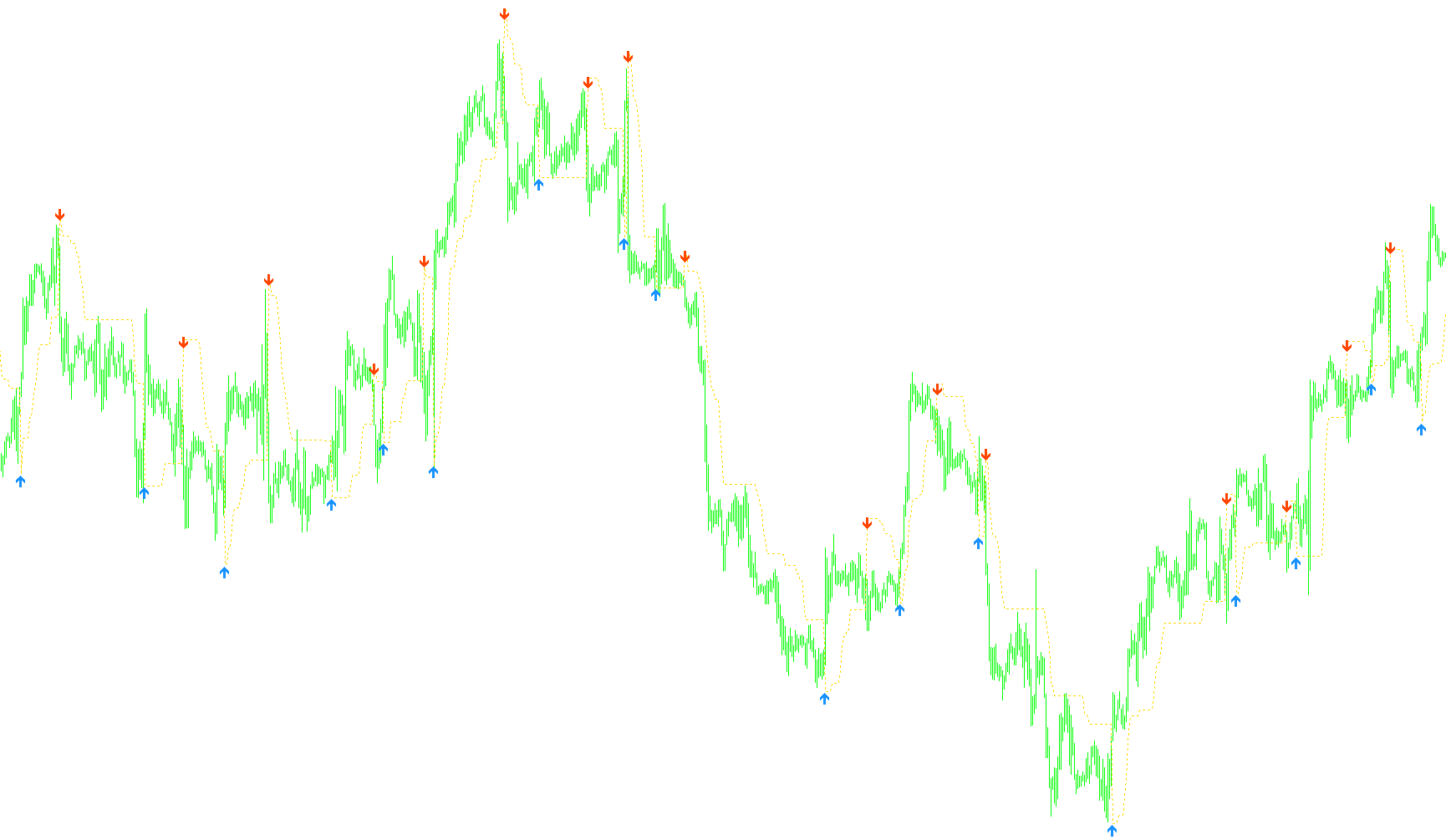
This indicator is designed to help traders visualize dynamic support and resistance levels on a price chart. It works by tracking "stop levels"—price points where a trend might change or a reversal might occur—and provides visual signals (arrows) when the price breaks through these levels in a specific manner.
Core Functionality
The tool operates on a "trailing" logic. Instead of just drawing a static line, it constantly monitors the relationship between the current price and the previous stop level to decide how that line should move.
Two Ways to Calculate Price Distance
The indicator offers two distinct methods for determining how far away from the price the "stop line" should be placed:
- ATR Mode (Automated): This is the dynamic approach. It uses a mathematical calculation called the Average True Range (ATR), which measures market volatility. The script takes this volatility measurement, smooths it out to remove "noise," and multiplies it by a user-defined factor. This means that when the market is volatile, the stop line moves further away; when the market is calm, the line tightens.
- Fixed Stop Mode (Manual): In this mode, the indicator ignores market volatility and uses a constant number of pips (points) provided by the user to set the distance for the stop line.
How the Logic Works on the Chart
The script follows a specific set of rules to manage the behavior of the dotted stop line:
- Trend Following: If the price is moving in a direction and stays above or below the previous stop level, the indicator attempts to "drag" the new stop level along with the price. It ensures the line moves forward relative to the trend rather than jumping backward.
- Breakout Detection: The indicator looks for moments where the price crosses over the previous stop level.
- If the price closes significantly above the previous level, it triggers an "Up" signal and establishes a new higher stop level.
- If the price closes significantly below the previous level, it triggers a "Down" signal and establishes a new lower stop level.
- Visual Signals: When these breakouts occur, the script automatically places colored arrows on the chart. These arrows serve as immediate visual cues for traders to identify potential reversal points or trend continuations.
User Customization Options
The script allows users to fine-tune how this logic is displayed:
- Colors and Distance: You can change the colors of the buy/sell arrows and adjust how far they appear from the actual stop line to ensure they are easy to see.
- Smoothing: Users can adjust how "reactive" the ATR calculation is, allowing them to choose between a very smooth, slow-moving line or a more responsive one that reacts quickly to price changes.
- On-Screen Info: There is an option to display a text comment on the chart that summarizes the current settings being used by the indicator.
//+------------------------------------------------------------------+
//|                                            MT4-LevelStop-Reverse |
//|                                                      Version 1.0 |
//|                     Copyright © 2007, Bruce Hellstrom (brucehvn) |
//|                                              bhweb@speakeasy.net |
//|                                       http://www.metaquotes.net/ |
//+------------------------------------------------------------------+

/////////////////////////////////////////////////////////////////////
// Version 1.0
//
// This is a port of the VTTrader VT-LevelStop-Reverse trading system.
// This is ported as an MT4 indicator only and perhaps can be evolved
// into an EA later.
//
/////////////////////////////////////////////////////////////////////

/*

This is a combination of two VT Trader trading systems.  The first is the default
VT-LevelStop-Reverse and the second is one that was modified to allow customizing
the ATR settings for calculating the stop line.  I've tried to combine these 2
versions into a single MT4 indicator.

The default VT version allows you to use two modes, optimized, and manual.
Optimized mode calculates the stop line by using a 14 period EMA smoothed
ATR(14) multiplied by a fixed multiplier of 2.824. In manual mode, you set a
fixed number of pips you want the stop line to be drawn. In my MT4 version,
there are two modes:

1. ATR mode (customizable ATR period, multiplier, and smoothing)
2. Fixed stop mode (customizable fixed stop)

The input parameters are as follows:

* UseATRMode -     This calculates the stop line based on ATR using customizable period, multiplier and smoothing.
* NonATRStopPips - If "UseATRMode" is false, then this value is the number of fixed pips to place the stop line.
* ATRPeriod -      If "UseATRMode" is true, then this sets the ATR period.
* ATRMultiplier -  If "UseATRMode" is true, then the ATR value will be multiplied by this value when calculating the stop line.
* ATRSmoothing -   If "UseATRMode" is true, then this will smooth the selected ATR with an EMA of this smoothing period.
* UpArrowColor -   The color the Up arrows will display in.
* DnArrowColor -   The color the Down arrows will display in.
* ArrowDistance -  This can adjust the distance away from the stop line that the arrows appear. By default, the arrows appear directly above or below the stop line. A positive number here will move the arrows further away from the price.  A negative number will move it closer to the price.
* ShowComment - This will turn on/off the comment on the chart.  Turn off if you have other indicators that put data there and you don't want it overwritten.

For the default VT-LevelStop-Reverse behavior, set the following:
UseATRMode = true
ATRPeriod = 14
ATRMultiplier = 2.824
ATRSmoothing = 14

To use this indicator, copy it to your <MetaTrader Folder>\experts\indicators folder. Then restart MT4. It will appear in the custom indicators list.

Revision History

Version Beta 0.2
* Minor bug fixes.
* Remove extra "UseVTDefault" option.
* Add smoothing option for compatibility with default VT version.

Version Beta 0.3
* Delete objects at startup.
* Use a more unique object name prefix.
* Change ATRBuffer and SmoothBuffer to be non-indicator buffers.
* No need for UpSignal and DnSignal to be buffers.
* Change arrows to display at the stop line.
* Fix bug on current bar drawing that would cause multiple arrows to appear.

Version Beta 0.4
* Fix bug in non-indicator buffers that was causing erroneous data in the ATR buffer and smoothing buffer.

Version 1.0
* Fix some problems with the original VT formula that caused arrows to be drawn incorrectly if the price closed at the exact same level as the stop line.Fix bug in non-indicator buffers that was causing erroneous data in the ATR buffer and smoothing buffer.
* Add some print statements for arrow tracking.
* Always smooth, just use 1 for a value if no smoothing is indicated.
* Add ShowComment option

*/

#property copyright "Copyright © 2007, Bruce Hellstrom (brucehvn)"
#property link      "http: //www.metaquotes.net/"

#property indicator_chart_window
#property indicator_buffers 1
#property indicator_color1 Magenta
#property indicator_style1 STYLE_DOT

#define INDICATOR_VERSION "v1.0"
#define VTS_OBJECT_PREFIX "vtsbh2483-"
#define MAX_OBJECT_NUM 32768


//---- input parameters

extern bool UseATRMode = true;
extern int NonATRStopPips = 40;
extern int ATRPeriod = 9;
extern double ATRMultiplier = 3.0;
extern int ATRSmoothing = 0;
extern color UpArrowColor = DodgerBlue;
extern color DnArrowColor = OrangeRed;
extern int ArrowDistance = 0;
extern bool ShowComment = true;

//---- buffers
double TrStopLevel[];

//---- variables
double ATRBuffer[];
double SmoothBuffer[];
string ShortName;
int ArrowObjects = 0;
int PrevArrows = 0;


//+------------------------------------------------------------------+
//| Custom indicator initialization function                         |
//+------------------------------------------------------------------+
int init() {

    int DrawBegin = 0;
    if ( UseATRMode ) {
        DrawBegin = ATRPeriod;
    }

    // Set the smoothing to 1 if it is zero or less
    if ( ATRSmoothing <= 0 ) {
        ATRSmoothing = 1;
    }

    IndicatorBuffers( 1 );
    SetIndexStyle( 0, DRAW_LINE, STYLE_DOT, 1 );
    SetIndexBuffer( 0, TrStopLevel );
    SetIndexDrawBegin( 0, DrawBegin );

    ShortName = "MT4-LevelStop-Reverse-" + INDICATOR_VERSION + "(";

    if ( UseATRMode ) {
        ShortName = StringConcatenate( ShortName, "ATRMode ", ATRPeriod, ", ",
                                       ATRMultiplier, ", ", ATRSmoothing, " )" );
    }
    else {
        ShortName = StringConcatenate( ShortName, "Manual Mode Stop = ", NonATRStopPips, " )" );
    }

    IndicatorShortName( ShortName );
    SetIndexLabel( 0, ShortName );

    Print( ShortName );
    Print( "Copyright (c) 2007 - Bruce Hellstrom, bhweb@speakeasy.net" );

    MathSrand( TimeLocal() );

    // Cleanup any leftover objects from previous runs
    DeleteAllArrowObjects();

    return( 0 );
}

//+------------------------------------------------------------------+
//| Custom indicator deinitialization function                         |
//+------------------------------------------------------------------+
int deinit() {
    DeleteAllArrowObjects();
    return( 0 );
}

//+------------------------------------------------------------------+
//| Function run on every tick                                       |
//+------------------------------------------------------------------+
int start() {
    Comment( ShortName );

    int ictr;
    int counted_bars = IndicatorCounted();

    // Check for errors
    if ( counted_bars < 0 ) {
        return( -1 );
    }

    // Last bar will be recounted
    if ( counted_bars > 0 ) {
        counted_bars--;
    }

    int limit = Bars - counted_bars;
    ictr = limit - 1;

    if ( UseATRMode && Bars < ATRPeriod ) {
        return( 0 );
    }

    // Make sure buffers are sized correctly
    int buff_size = ArraySize( TrStopLevel );
    if ( ArraySize( ATRBuffer ) != buff_size ) {
        ArraySetAsSeries( ATRBuffer, false );
        ArrayResize( ATRBuffer, buff_size );
        ArraySetAsSeries( ATRBuffer, true );

        ArraySetAsSeries( SmoothBuffer, false );
        ArrayResize( SmoothBuffer, buff_size );
        ArraySetAsSeries( SmoothBuffer, true );
    }

    int xctr;

    if ( UseATRMode ) {
        // First calculate the ATR
        for ( xctr = 0; xctr < limit; xctr++ ) {
            ATRBuffer[xctr] = iATR( NULL, 0, ATRPeriod, xctr );
        }

        // Smooth the ATR
        for ( xctr = 0; xctr < limit; xctr++ ) {
            SmoothBuffer[xctr] = Wilders( ATRBuffer, ATRSmoothing, xctr );
        }
    }


    for ( xctr = ictr; xctr >= 0; xctr-- ) {
         // Calculate the stop amount
        double DeltaStop = NonATRStopPips * Point;

        // Calculate our stop value based on ATR if required
        if ( UseATRMode ) {
            DeltaStop = NormalizeDouble( SmoothBuffer[xctr] * ATRMultiplier, 4 );
        }

        // Figure out where the current bar's stop level should be
        double NewStopLevel;
        double PrevStop = TrStopLevel[xctr + 1];
        bool Up = false;
        bool Dn = false;

        if ( Close[xctr] == PrevStop ) {
            NewStopLevel = PrevStop;
        }
        else {
            if ( Close[xctr + 1] <= PrevStop && Close[xctr] < PrevStop ) {
                NewStopLevel = MathMin( PrevStop, ( Close[xctr] + DeltaStop ) );
            }
            else {
                if ( Close[xctr + 1] >= PrevStop && Close[xctr] > PrevStop ) {
                    NewStopLevel = MathMax( PrevStop, ( Close[xctr] - DeltaStop ) );
                }
                else {
                    if ( Close[xctr] > PrevStop ) {
                        NewStopLevel = Close[xctr] - DeltaStop;
                        Up = true;
                    }
                    else {
                        NewStopLevel = Close[xctr] + DeltaStop;
                        Dn = true;
                    }
                }
            }
        }

        TrStopLevel[xctr] = NewStopLevel;

        // Can't do the arrows until the bar closes
        if ( xctr > 0 ) {
            if ( Up ) {
                double UpSignal = TrStopLevel[xctr] - ( ArrowDistance * Point );
                string ObjName = GetNextObjectName();
                ObjectCreate( ObjName, OBJ_ARROW, 0, Time[xctr], UpSignal );
                ObjectSet( ObjName, OBJPROP_COLOR, UpArrowColor );
                ObjectSet( ObjName, OBJPROP_ARROWCODE, 233 );
                ArrowObjects++;
            }

            if ( Dn ) {
                double DnSignal = TrStopLevel[xctr] + ( 2 * Point ) + ( ArrowDistance * Point );
                ObjName = GetNextObjectName();
                ObjectCreate( ObjName, OBJ_ARROW, 0, Time[xctr], DnSignal );
                ObjectSet( ObjName, OBJPROP_COLOR, DnArrowColor );
                ObjectSet( ObjName, OBJPROP_ARROWCODE, 234 );
                ArrowObjects++;
            }
        }
    }

    if ( ArrowObjects != PrevArrows ) {
        Print( "Total Arrow Objects: ", ArrowObjects );
        PrevArrows = ArrowObjects;
    }

    return( 0 );
}


//+------------------------------------------------------------------+
//| Gets the next object index so they can be deleted later          |
//+------------------------------------------------------------------+
string GetNextObjectName() {
    int rand_val = MathRand() + 1;
    string retval = VTS_OBJECT_PREFIX + rand_val;
    return( retval );
}


//+------------------------------------------------------------------+
//| Wilders Calculation                                              |
//+------------------------------------------------------------------+
double Wilders( double& indBuffer[], int Periods, int shift ) {
    double retval = 0.0;
    retval = iMAOnArray( indBuffer, 0, ( Periods * 2 ) - 1, 0, MODE_EMA, shift );
    return( retval );
}

//+------------------------------------------------------------------+
//| Delete all the arrow objects                                     |
//+------------------------------------------------------------------+
void DeleteAllArrowObjects() {
    int delcnt = 0;
    for ( int ictr = 0; ictr < MAX_OBJECT_NUM; ictr++ ) {
        string ObjName = VTS_OBJECT_PREFIX + ( ictr + 1 );
        if ( ObjectDelete( ObjName ) ) {
            delcnt++;
        }
    }
    Print( "Objects deleted: ", delcnt );
    return;
}


//+------------------------------------------------------------------+
Comments