F-Channel
Download script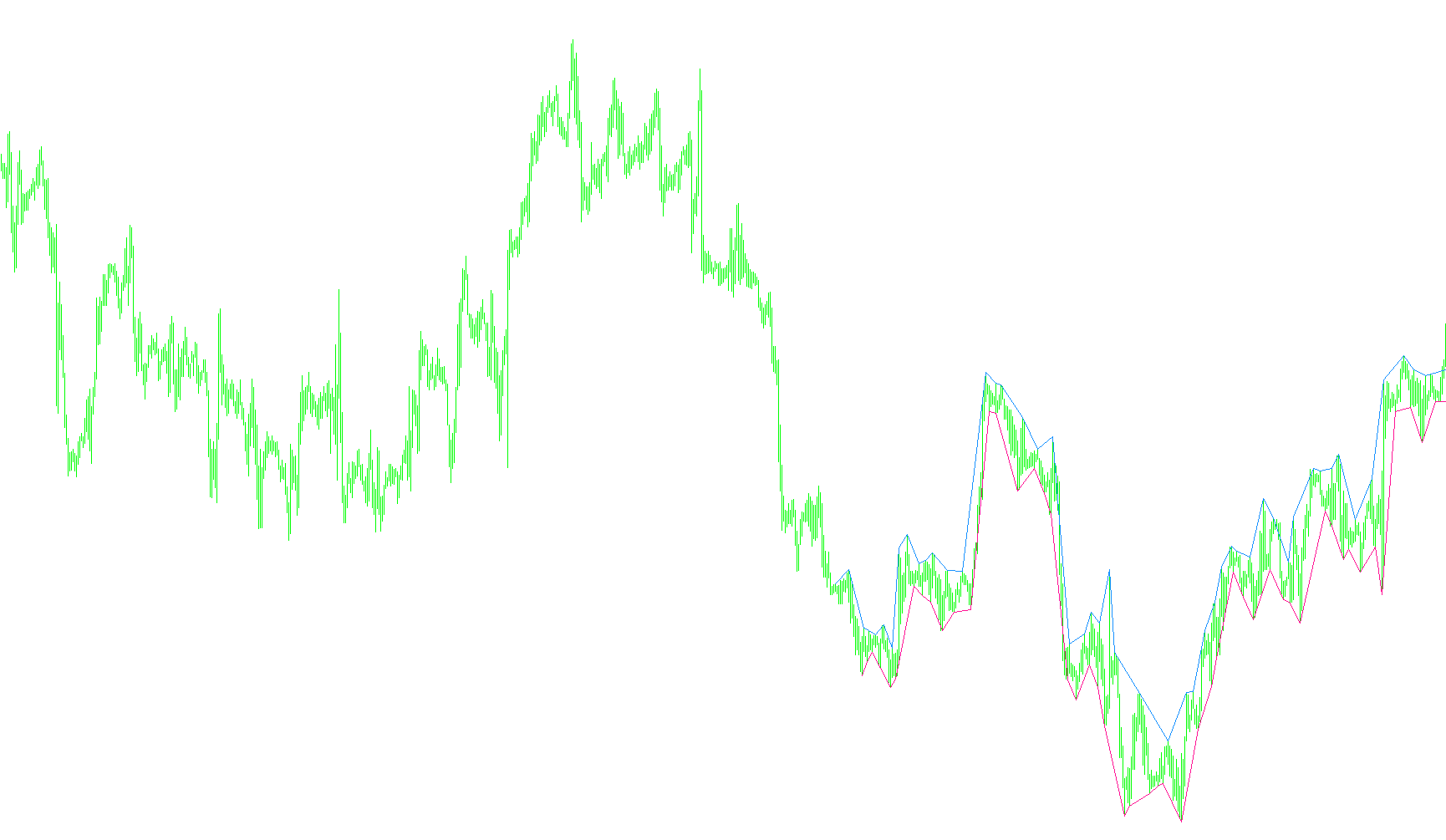
The Fractal Channel is a specialized visual analysis tool designed to help traders identify key structural trends and price boundaries on a currency chart. Rather than cluttering the screen with raw data, this script automatically detects and draws trend lines based on significant "fractal" price points—which are the natural peaks and valleys where the market shows a temporary change in direction.
How the Logic Works
1. Identification of Key Turning Points The core logic of this tool relies on identifying "Fractals." In market terms, these are specific high and low points where the price has shifted enough to create a distinct turning point. The script scans your historical chart data to find these structural highs and lows automatically.
2. Automated Trend Line Construction Once the script identifies these key points, it connects them to form a series of trend lines:
- Upper Trend Lines (Highs): The tool looks for consecutive peaks in the price action. It draws lines connecting these "fractal highs" to help visualize resistance levels—areas where the price has historically struggled to break upward.
- Lower Trend Lines (Lows): Similarly, the tool scans for consecutive valleys to draw lines connecting "fractal lows." These represent support levels, showing where the price has historically found a floor and bounced back up.
3. Dynamic Updating The logic is designed to be "live." As new price data enters the market and new fractal points are formed, the script automatically updates the existing lines. This ensures that your visual representation of the trend moves in real-time with the current market conditions.
4. Customizable Depth You can define exactly how many trend lines you want the tool to track at once (up to a user-defined count). This allows for a customized view, whether you prefer to see only the most immediate price structure or a deeper history of previous support and resistance levels.
Visual Summary for Traders
- Color Coding: The script distinguishes between the two types of trends using different colors (e.g., Blue for upper highs and Pink for lower lows), making it easy to differentiate between "ceilings" and "floors" at a glance.
- Ray Extension: The primary trend line can be set to extend forward into the future as a "ray," allowing you to project current market momentum and see where price might head next based on the established geometry of the fractal points.
By automating the connection of these significant price turns, the Fractal Channel removes the guesswork from manual drawing, providing a clear, organized map of the market's historical backbone.
//+--------------------------------------------------------------------------------------+
//                                                F R A C T A L       C H A N N E L      |
//                                        Copyright © RickD  BJF Trading Group 2006      |
//                                                             http://fxstrategy.ca      |
//                                                                                       |
//Experts http://fxstrategy.ca/experts.php      SALE! 50% OFF                            |
//Indicators http://fxstrategy.ca/products.php  SALE!50% OFF                             |
//Digital Filters Strategy http://fxstrategy.ca/digital_filtrs.php  SALE!50% OFF         |
//Trading Signals http://fxstrategy.ca/signals.php Two weeks FREE! No CC.                |
// forex calendar, research, article ....                                                |
//+--------------------------------------------------------------------------------------+
#property copyright "© RickD  BJF Trading Group 2006"
#property link      "http://fxstrategy.ca/products.php"
#property  indicator_chart_window
#property  indicator_buffers 0

extern int cnt = 50;
extern color HHTL_color = DodgerBlue;
extern color LLTL_color = DeepPink;

string prefix = "xTop_";

//~~~~~~~~~~~~~~~~~~~~~~~~~~~~~~~~~~~~~~~~~~~~~~~~~~~~~~~~~~~~~~~~~~~~~~~~~~~~~~~~~~~~~~~~~~~~~~~

void init() {
  clear();
  show();
}

void deinit() {
  clear();
}

void start()
{
  show();
}

void show() {

  string name = "";

  double fr1, fr2;
  int bar1, bar2;

  int i = 2;
  for (int j=0; j < cnt; j++) {

    for (; i < Bars; i++) {
      fr1 = iFractals(NULL, 0, MODE_UPPER, i);
      if (fr1 > 0) {
        bar1 = i;
        break;
      }
    }

    for (i=i+2; i < Bars; i++) {
      fr2 = iFractals(NULL, 0, MODE_UPPER, i);
      if (fr2 > 0) {
        bar2 = i;
        break;
      }
    }


    name = prefix + "HHTL" + j;
    if (ObjectFind(name) == -1) {
      ObjectCreate(name, OBJ_TREND, 0, Time[bar2], fr2, Time[bar1], fr1);
      ObjectSet(name, OBJPROP_COLOR, HHTL_color);
      ObjectSet(name, OBJPROP_STYLE, STYLE_SOLID);
      ObjectSet(name, OBJPROP_WIDTH, 0);
      ObjectSet(name, OBJPROP_RAY, j==0);
    }
    else
    {
      ObjectMove(name, 0, Time[bar2], fr2);
      ObjectMove(name, 1, Time[bar1], fr1);
    }
  }

  i = 2;
  for (j=0; j < cnt; j++) {
    for (; i < Bars; i++) {
      fr1 = iFractals(NULL, 0, MODE_LOWER, i);
      if (fr1 > 0) {
        bar1 = i;
        break;
      }
    }

    for (i=i+2; i < Bars; i++) {
      fr2 = iFractals(NULL, 0, MODE_LOWER, i);
      if (fr2 > 0) {
        bar2 = i;
        break;
      }
    }

    name = prefix + "LLTL" + j;
    if (ObjectFind(name) == -1) {
      ObjectCreate(name, OBJ_TREND, 0, Time[bar2], fr2, Time[bar1], fr1);
      ObjectSet(name, OBJPROP_COLOR, LLTL_color);
      ObjectSet(name, OBJPROP_STYLE, STYLE_SOLID);
      ObjectSet(name, OBJPROP_WIDTH, 0);
      ObjectSet(name, OBJPROP_RAY, j==0);
    }
    else
    {
      ObjectMove(name, 0, Time[bar2], fr2);
      ObjectMove(name, 1, Time[bar1], fr1);
    }
  }
}

void clear()
{
  string name = "";
  int res = -1;

  for (int j=0; j < cnt; j++) {
    name = prefix + "HHTL" + j;
    if (ObjectFind(name) != -1) ObjectDelete(name);

    name = prefix + "LLTL" + j;
    if (ObjectFind(name) != -1) ObjectDelete(name);
  }
}
Comments