SMA-Crossover_Signal_v1
Download script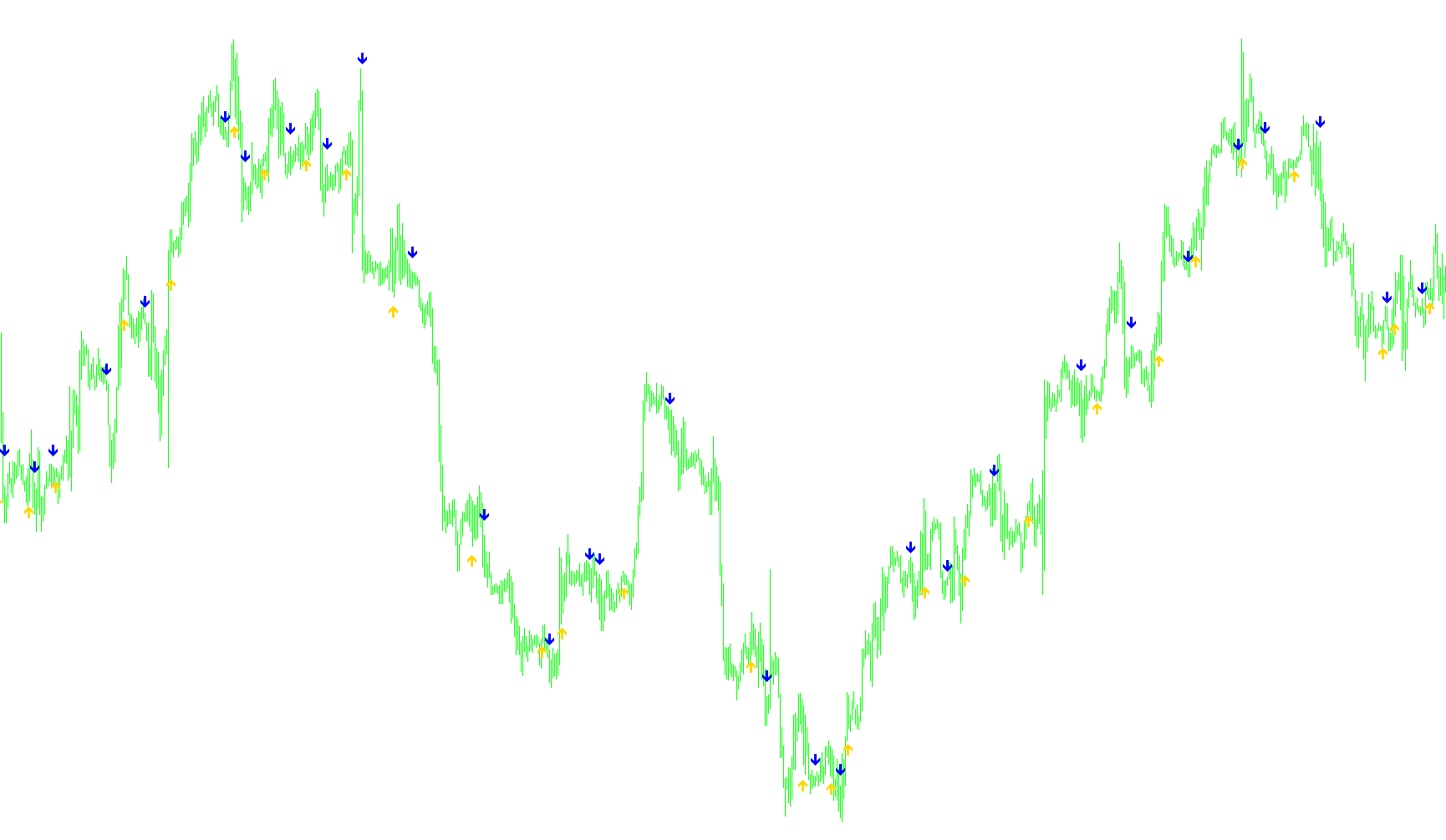
SMA-Crossover Signal Overview
This script is designed as a visual aid for traders who use Simple Moving Averages (SMA) to determine market trends. Its primary purpose is to identify and pinpoint the exact moment when two different moving averages intersect, providing clear visual cues for potential trend shifts.
How the Logic Works
The tool functions by monitoring two distinct moving averages simultaneously—a "Faster" SMA and a "Slower" SMA. By comparing the price data of these two averages over time, the script looks for specific crossover events:
- Bullish Signals (Upward Cross): The logic detects when the Faster SMA moves from below the Slower SMA to above it. When this transition occurs, the script places a visual indicator (an arrow) on the chart.
- Bearish Signals (Downward Cross): Conversely, the logic identifies when the Faster SMA drops from above the Slower SMA to below it, marking a potential shift to a downward trend with a corresponding visual indicator.
Key Features and Functionality
- Enhanced Visibility: One of the primary benefits of this script is its ability to highlight crossovers that might be difficult to see on a standard chart. In fast-moving markets or at certain zoom levels, the actual moving average lines can become obscured by price bars (candlesticks). This tool isolates the crossover points so you don't miss them.
- Clean Chart Environment: Because the script identifies these signals automatically, it allows traders to remove the actual SMA lines from their charts entirely. This results in a much cleaner visual workspace while still providing the necessary data points for decision-making.
- Dynamic Positioning: To ensure the indicators are easy to read, the script calculates the "Range" (the height of the price bars) in the area where the crossover occurs. It then intelligently places the signal arrows at a specific distance above or below the candles so they do not overlap with the price action.
- Customizable Periods: The tool is user-friendly, allowing you to define the specific lengths for both the Faster and Slower SMAs to match your personal trading strategy.
Indicators Used
Miscellaneous
7
Views
0
Downloads
0
Favorites
SMA-Crossover_Signal_v1
/*-----------------------------+
|			       |
| Shared by www.Aptrafx.com    |
|			       |
+------------------------------*/

//+------------------------------------------------------------------+
//|                                         SMA-Crossover_Signal.mq4 |
//|         Copyright © 2005, Jason Robinson (jnrtrading)            |
//|                   http://www.jnrtading.co.uk                     |
//+------------------------------------------------------------------+

/*
  +-------------------------------------------------------------------+
  | Allows you to enter two sma periods and it will then show you at |
  | Which point they crossed over. It is more usful on the shorter    |
  | periods that get obscured by the bars / candlesticks and when     |
  | the zoom level is out. Also allows you then to remove the emas    |
  | from the chart. (smas are initially set at 9 and 18)              |
  +-------------------------------------------------------------------+
*/
#property copyright "Copyright © 2005, Jason Robinson (jnrtrading)"
#property link      "http://www.jnrtrading.co.uk"

#property indicator_chart_window
#property indicator_buffers 2
#property indicator_color1 SpringGreen
#property indicator_color2 Red

double CrossUp[];
double CrossDown[];
extern int FasterSMA = 9;
extern int SlowerSMA = 18;
//+------------------------------------------------------------------+
//| Custom indicator initialization function                         |
//+------------------------------------------------------------------+
int init()
  {
//---- indicators
   SetIndexStyle(0, DRAW_ARROW, EMPTY);
   SetIndexArrow(0, 233);
   SetIndexBuffer(0, CrossUp);
   SetIndexStyle(1, DRAW_ARROW, EMPTY);
   SetIndexArrow(1, 234);
   SetIndexBuffer(1, CrossDown);
//----
   return(0);
  }
//+------------------------------------------------------------------+
//| Custom indicator deinitialization function                       |
//+------------------------------------------------------------------+
int deinit()
  {
//----

//----
   return(0);
  }
//+------------------------------------------------------------------+
//| Custom indicator iteration function                              |
//+------------------------------------------------------------------+
int start() {
   int limit, i, counter;
   double fasterSMAnow, slowerSMAnow, fasterSMAprevious, slowerSMAprevious, fasterSMAafter, slowerSMAafter;
   double Range, AvgRange;
   int counted_bars=IndicatorCounted();
//---- check for possible errors
   if(counted_bars<0) return(-1);
//---- last counted bar will be recounted
   if(counted_bars>0) counted_bars--;

   limit=Bars-counted_bars;

   for(i = 0; i <= limit; i++) {

      counter=i;
      Range=0;
      AvgRange=0;
      for (counter=i ;counter<=i+9;counter++) {
         AvgRange=AvgRange+MathAbs(High[counter]-Low[counter]);
      }
      Range=AvgRange/10;

      fasterSMAnow = iMA(NULL, 0, FasterSMA, 0, MODE_SMA, PRICE_CLOSE, i);
      fasterSMAprevious = iMA(NULL, 0, FasterSMA, 0, MODE_SMA, PRICE_CLOSE, i+1);
      fasterSMAafter = iMA(NULL, 0, FasterSMA, 0, MODE_SMA, PRICE_CLOSE, i-1);

      slowerSMAnow = iMA(NULL, 0, SlowerSMA, 0, MODE_SMA, PRICE_CLOSE, i);
      slowerSMAprevious = iMA(NULL, 0, SlowerSMA, 0, MODE_SMA, PRICE_CLOSE, i+1);
      slowerSMAafter = iMA(NULL, 0, SlowerSMA, 0, MODE_SMA, PRICE_CLOSE, i-1);

      if ((fasterSMAnow > slowerSMAnow) && (fasterSMAprevious < slowerSMAprevious) && (fasterSMAafter > slowerSMAafter)) {
         CrossUp[i] = Low[i] - Range*0.5;
      }
      else if ((fasterSMAnow < slowerSMAnow) && (fasterSMAprevious > slowerSMAprevious) && (fasterSMAafter < slowerSMAafter)) {
         CrossDown[i] = High[i] + Range*0.5;
      }
   }
   return(0);
}
Comments