iTrend_v2
Download script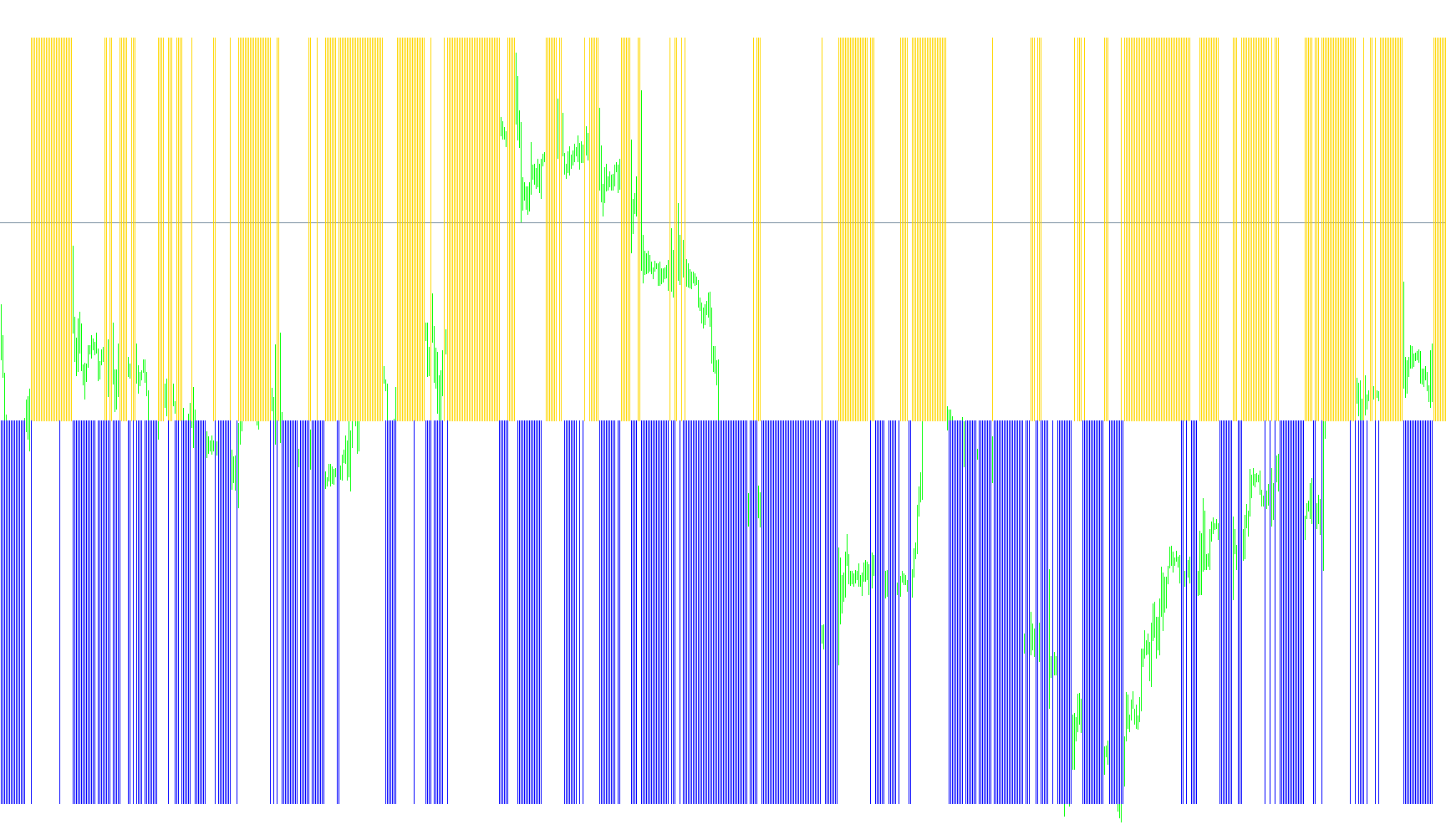
The iTrend indicator is a visual trading tool designed to help identify market direction and momentum by analyzing price action relative to specific statistical averages. Rather than cluttering your main chart with complex lines, it operates in a separate window at the bottom of your screen, providing a simplified "signal" based on two primary mathematical components: Bollinger Band logic and Power Dynamics.
How the Logic Works
The indicator processes market data through two distinct filters to determine the current trend:
1. The Trend Position (X-Axis Logic) The script calculates the relationship between the current market price and a standard Bollinger Band calculation. By comparing where the price sits in relation to these bands, the tool determines if the market is currently trending "above" or "below" its expected path.
- If the price is positioned favorably relative to the bands, it generates a positive signal.
- If the price falls below the established threshold, the signal neutralizes.
2. The Momentum Strength (Y-Axis Logic) Simultaneously, the script calculates "Power" values by measuring the strength of bullish and bearish movements over a specific timeframe. It combines these forces to see which side of the market is exerting more pressure. This provides a measure of how aggressively the price is moving in one direction versus another.
Visual Representation
The final output is displayed as a dual-colored histogram:
- Blue Histograms: These appear when the price position and momentum are aligned, indicating a specific directional trend.
- Red Histograms: These highlight opposing market conditions where the pressure shifts in the opposite direction.
Customization Options
The script is highly flexible, allowing you to fine-tune how it perceives "normal" market behavior through several adjustable settings:
- Price Sources: You can choose which specific price data the indicator looks at (e.g., whether it focuses on the Opening price, the High/Low of a candle, or the standard Closing price).
- Sensitivity Periods: You can adjust the look-back periods for both the Band calculations and the Power dynamics. This allows you to switch between identifying "fast" short-term fluctuations or "slow" long-term trends.
- Deviation Levels: You can modify how far the price must move from the average before a signal is triggered, helping to filter out minor market noise.
//+------------------------------------------------------------------+
//|                                                       iTrend.mq4 |
//|                                                tonyc2a@yahoo.com |
//|                                                                  |
//+------------------------------------------------------------------+
#property copyright "tonyc2a@yahoo.com"
#property link      ""
#property indicator_separate_window
#property indicator_buffers 2
#property indicator_color1 Blue
#property indicator_color2 Red
#property indicator_minimum -1
#property indicator_maximum 1


//---- input parameters
extern double iBandsDeviation=2;
extern int iBandsMode0_2=0;     // 0-2: MODE_MAIN, MODE_LOW, MODE_HIGH
extern int iBandsPrice0_6=0;    // 0-6: PRICE_CLOSE,PRICE_OPEN,PRICE_HIGH,PRICE_LOW,PRICE_MEDIAN,PRICE_TYPICAL,PRICE_WEIGHTED
extern int iBandsPeriod=20;     // 20
extern int iPowerPrice0_6=0;    // 0-6: PRICE_CLOSE,PRICE_OPEN,PRICE_HIGH,PRICE_LOW,PRICE_MEDIAN,PRICE_TYPICAL,PRICE_WEIGHTED
extern int iPowerPeriod=13;     // 13
extern int iPriceType0_3=0;     // 0-3: PRICE_CLOSE,PRICE_OPEN,PRICE_HIGH,PRICE_LOW

//---- buffers
double ExtMapBuffer1[];
double ExtMapBuffer2[];

//+------------------------------------------------------------------+
//| Custom indicator initialization function                         |
//+------------------------------------------------------------------+
int init()
  {
//---- indicators
   IndicatorBuffers(2);
   SetIndexStyle(0,DRAW_HISTOGRAM);
   SetIndexBuffer(0,ExtMapBuffer1);
   SetIndexLabel(0,"Blue");
   SetIndexStyle(1,DRAW_HISTOGRAM);
   SetIndexBuffer(1,ExtMapBuffer2);
   SetIndexLabel(1,"Red");
//----
   IndicatorShortName("iTrend");
//----
   return(0);
  }
//+------------------------------------------------------------------+
//| Custor indicator deinitialization function                       |
//+------------------------------------------------------------------+
int deinit()
  {
//---- TODO: add your code here
//----
   return(0);
  }
//+------------------------------------------------------------------+
//| Custom indicator iteration function                              |
//+------------------------------------------------------------------+
int start()
  {
   int    counted_bars=IndicatorCounted();
//---- TODO: add your code here

   //+----Processes user parameters-------------------------------------+
   double BandsMode,BandsPrice,PowerPrice;

   switch(iBandsMode0_2){
      case 1: BandsMode=MODE_LOWER;
      case 2: BandsMode=MODE_UPPER;
      default: BandsMode=MODE_MAIN;
      } //end switch

   switch(iBandsPrice0_6){
      case 1: BandsPrice=PRICE_OPEN;
      case 2: BandsPrice=PRICE_HIGH;
      case 3: BandsPrice=PRICE_LOW;
      case 4: BandsPrice=PRICE_MEDIAN;
      case 5: BandsPrice=PRICE_TYPICAL;
      case 6: BandsPrice=PRICE_WEIGHTED;
      default: BandsPrice=PRICE_CLOSE;
      } //end switch

   switch(iPowerPrice0_6){
      case 1: PowerPrice=PRICE_OPEN;
      case 2: PowerPrice=PRICE_HIGH;
      case 3: PowerPrice=PRICE_LOW;
      case 4: PowerPrice=PRICE_MEDIAN;
      case 5: PowerPrice=PRICE_TYPICAL;
      case 6: PowerPrice=PRICE_WEIGHTED;
      default: PowerPrice=PRICE_CLOSE;
      } //end switch
   //+------------------------------------------------------------------+

   //+----Main Section--------------------------------------------------+
   double CurrentPrice, value1, value2, x, y;

   for(int i=0;i<=Bars;i++){
      switch(iPriceType0_3){
         case 1: CurrentPrice=Open[i];
         case 2: CurrentPrice=High[i];
         case 3: CurrentPrice=Low[i];
         default: CurrentPrice=Close[i];
         } //end switch

      x=CurrentPrice-iBands(Symbol(),Period(),iBandsPeriod,iBandsDeviation,0,BandsPrice,BandsMode,i);
      y=-(iBullsPower(Symbol(),Period(),iPowerPeriod,PowerPrice,i) + iBearsPower(Symbol(),Period(),iPowerPeriod,PowerPrice,i));

      if(x<0) value1=0;
      if(x>0) value1=1;
      if(y<0) value2=0;
      if(y>0) value2=-1;

      ExtMapBuffer1[i]=value1;
      ExtMapBuffer2[i]=value2;
      } //end for
   //+------------------------------------------------------------------+

   //ObjectCreate("vl",OBJ_VLINE,WindowFind("iTrend"),Time[-1],Close[0]);

//----
   return(0);
  }
//+------------------------------------------------------------------+
Comments