i-DayOfWeek
Download script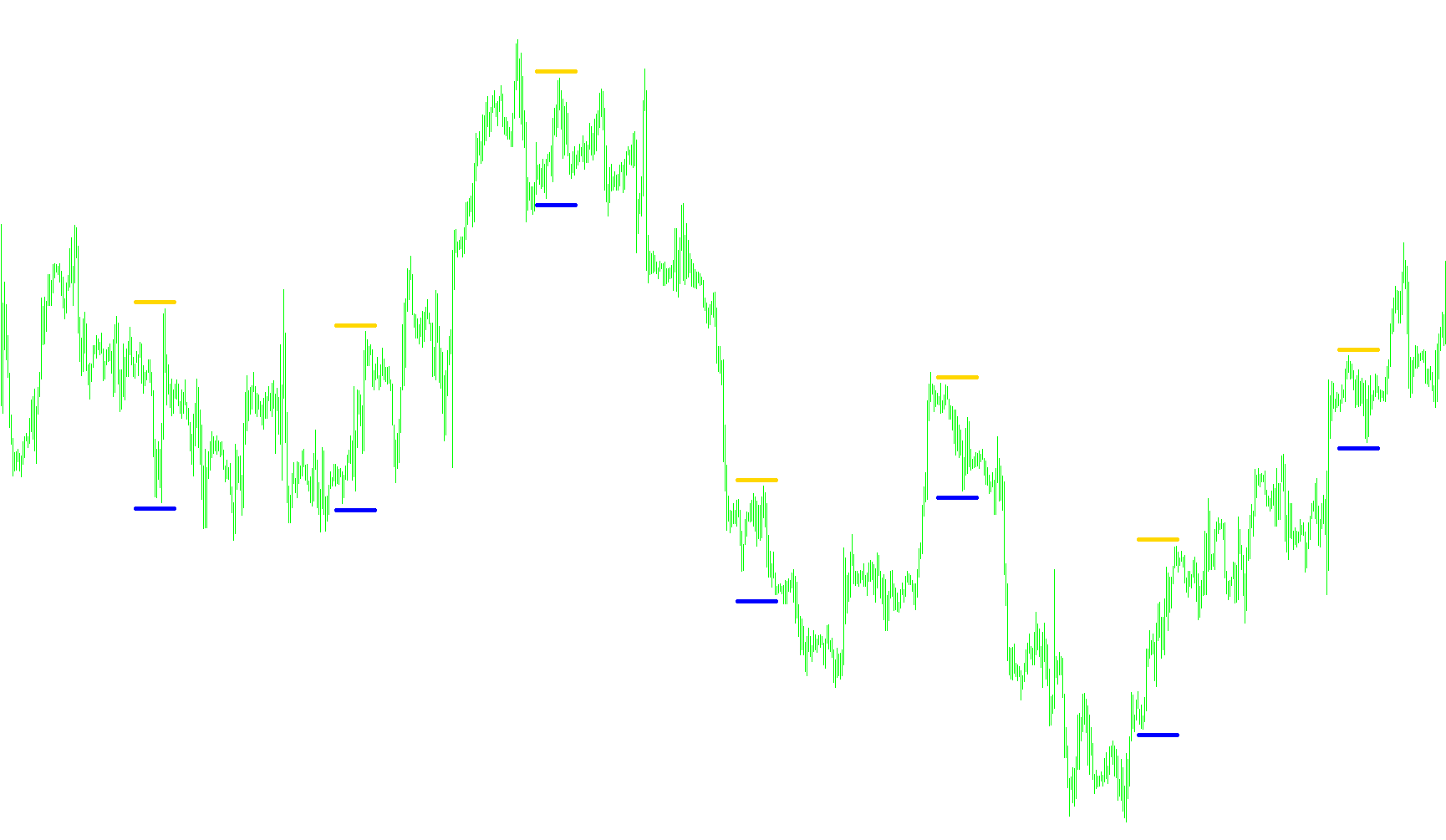
This tool is designed for MetaTrader users who need to visually identify specific days of the week on their trading charts. Instead of forcing you to manually scroll through history to find a particular day, this script automates the process by placing clear visual markers on your screen.
How it Works
The logic behind this indicator operates in three main stages:
1. User Customization When you load the tool, you can define two primary settings:
- Select the Day: You can choose exactly which day of the week you want to highlight (e.g., Monday, Wednesday, etc.).
- Set the Timeframe Depth: You can decide how far back into the past you want the tool to scan. You can choose to look at a specific number of bars or scan the entire historical chart available in your platform.
2. Automated Scanning and Detection The script automatically "walks" through your chart's history. As it moves, it performs several background checks:
- Date Identification: It recognizes every new day that occurs in the price history.
- Daily Highs and Lows: For every day it encounters, the tool identifies the highest and lowest price points reached during that specific 24-hour period.
- Day Matching: It constantly checks if the current date it is scanning matches the specific day you selected in your settings.
3. Visual Mapping Once the script finds a match for your chosen day, it places two distinct arrows on your chart:
- Upper Marker: Placed slightly above the highest price of that day.
- Lower Marker: Placed slightly below the lowest price of that day.
Dynamic Adjustments
To ensure the tool remains user-friendly regardless of the timeframe you are viewing (from 1-minute charts to weekly views), it includes an internal "Spacing Logic." This automatically adjusts the distance between the arrows and the price candles so that the markers remain clearly visible and don't clutter the screen, regardless of how zoomed in or out your chart is.
Summary for the Trader
Essentially, this tool acts as a historical map. It scans your data and places "bookmarks" on your chart specifically for the day of the week you care about most, allowing you to instantly see where the price highs and lows occurred on those specific dates without having to manually hunt for them in the calendar.
//+------------------------------------------------------------------+
//|                                                  i-DayOfWeek.mq4 |
//|                                           Êèì Èãîðü Â. aka KimIV |
//|                                              http://www.kimiv.ru |
//|                                                                  |
//| 13.10.2005  Ïîêàçûâàåò âûáðàííûé äåíü íåäåëè                     |
//+------------------------------------------------------------------+
#property copyright "Êèì Èãîðü Â. aka KimIV"
#property link      "http://www.kimiv.ru"
//----
#property indicator_chart_window
#property indicator_buffers 2
#property indicator_color1 Blue
#property indicator_color2 Salmon
//------- Âíåøíèå ïàðàìåòðû èíäèêàòîðà -------------------------------
extern int NumberDayOfWeek=1;   // Íîìåð äíÿ íåäåëè
extern int NumberOfBars   =0;   // Êîëè÷åñòâî áàðîâ îáñ÷¸òà (0-âñå)
//------- Ãëîáàëüíûå ïåðåìåííûå --------------------------------------
int ArrowInterval, prevDay;
//------- Ïîêëþ÷åíèå âíåøíèõ ìîäóëåé ---------------------------------
//------- Áóôåðû èíäèêàòîðà ------------------------------------------
double UpLine[];
double DnLine[];
//+------------------------------------------------------------------+
//| Custom indicator initialization function                         |
//+------------------------------------------------------------------+
  void init()
  {
   SetIndexBuffer(0, UpLine);
   SetIndexStyle (0, DRAW_ARROW);
   SetIndexArrow (0, 159);
   SetIndexEmptyValue(0, EMPTY_VALUE);
   SetIndexBuffer(1, DnLine);
   SetIndexStyle (1, DRAW_ARROW);
   SetIndexArrow (1, 159);
   SetIndexEmptyValue(1, EMPTY_VALUE);
   ArrowInterval=GetArrowInterval();
   Comment(NameDayOfWeek(NumberDayOfWeek));
  }
//+------------------------------------------------------------------+
//| Custom indicator deinitialization function                       |
//+------------------------------------------------------------------+
  void deinit()
  {
   Comment("");
  }
//+------------------------------------------------------------------+
//| Custom indicator iteration function                              |
//+------------------------------------------------------------------+
  void start()
  {
   double dMax, dMin;
   int    loopbegin, nsb, shift;
//----
   if (NumberOfBars==0) loopbegin=Bars - 1;
   else loopbegin=NumberOfBars - 1;
     for(shift=0; shift<=loopbegin; shift++)
     {
        if (prevDay!=TimeDay(Time[shift]))
        {
         nsb=iBarShift(NULL, PERIOD_D1, Time[shift]);
         dMax=iHigh(NULL, PERIOD_D1, nsb)+ArrowInterval*Point;
         dMin=iLow (NULL, PERIOD_D1, nsb)-ArrowInterval*Point;
        }
        if (TimeDayOfWeek(Time[shift])==NumberDayOfWeek)
        {
         UpLine[shift]=dMax;
         DnLine[shift]=dMin;
        }
      prevDay=TimeDay(Time[shift]);
     }
  }
//+------------------------------------------------------------------+
//| Âîçâðàùàåò èíòåðâàë óñòàíîâêè ñèãíàëüíûõ óêàçàòåëåé              |
//+------------------------------------------------------------------+
  int GetArrowInterval()
  {
   int p=Period();
     switch(p)
     {
         case 1:     return(5);
         case 5:     return(7);
         case 15:    return(10);
         case 30:    return(15);
         case 60:    return(20);
         case 240:   return(30);
         case 1440:  return(40);
         case 10080: return(150);
         case 43200: return(250);
        }
     }
//+------------------------------------------------------------------+
//| Âîçâðàùàåò íàèìåíîâàíèå äíÿ íåäåëè                               |
//+------------------------------------------------------------------+
           string NameDayOfWeek(int ndw)
           {
            if (ndw==0) return("Âîñêðåñåíüå");
            if (ndw==1) return("Ïîíåäåëüíèê");
            if (ndw==2) return("Âòîðíèê");
            if (ndw==3) return("Ñðåäà");
            if (ndw==4) return("×åòâåðã");
            if (ndw==5) return("Ïÿòíèöà");
            if (ndw==6) return("Ñóááîòà");
           }
//+------------------------------------------------------------------+
Comments