Gann_v1
Download script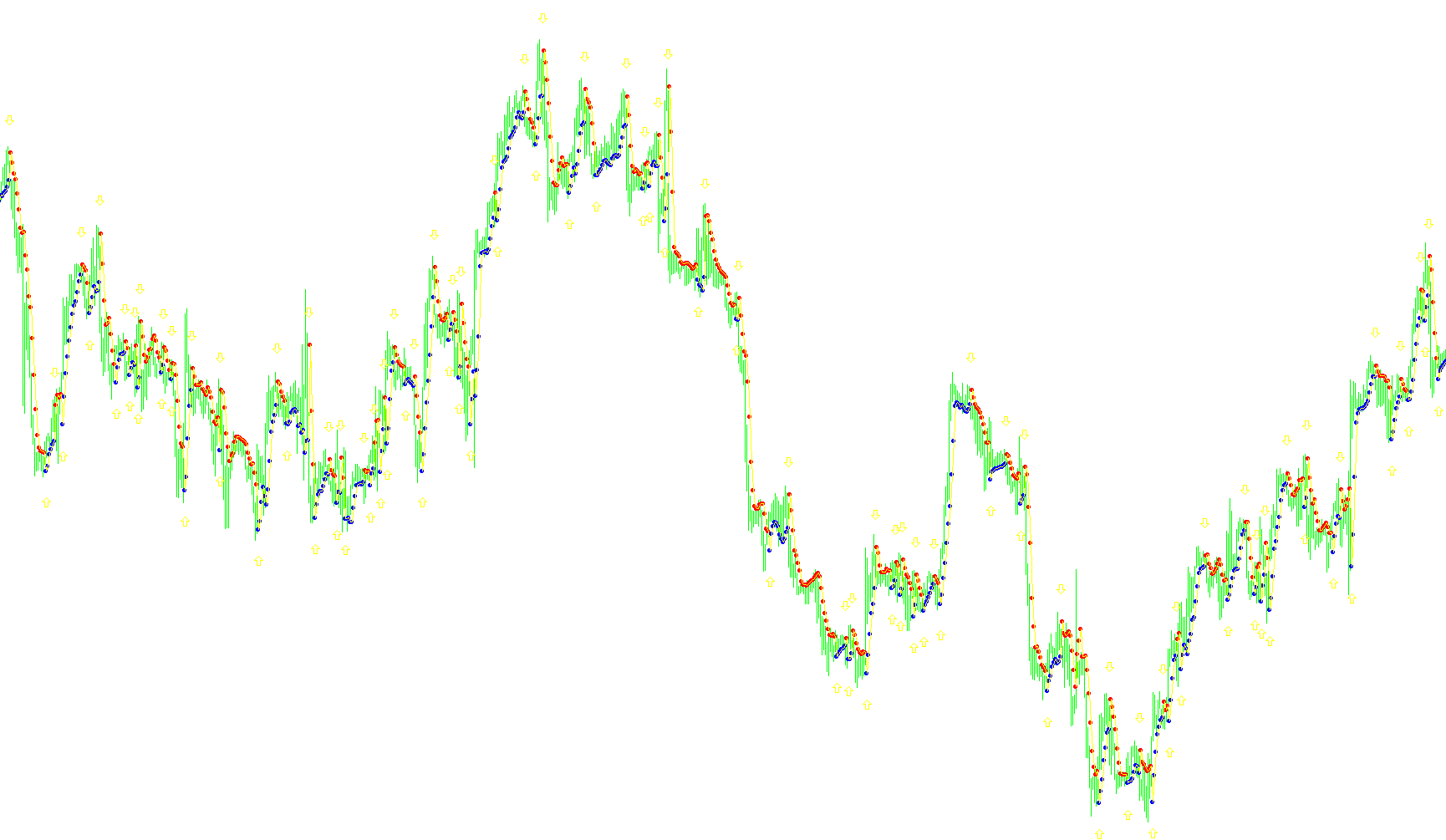
The HiLo Activator is a specialized technical analysis tool designed to help traders identify potential trend reversals and significant price movements on a trading chart. It works by monitoring the relationship between current market prices and two specific moving averages based on the highest and lowest points reached over a set period.
Core Logic and Functionality
The script operates by calculating "boundaries" for the price. Instead of looking at the standard closing price alone, it focuses on the extremes (the highs and lows) to determine the prevailing market structure. Here is how the logic flows:
- Dynamic Boundary Tracking: The tool calculates two moving averages simultaneously: one based on the highest prices and another based on the lowest prices over a user-defined timeframe (the "R" value).
- Swing Identification: The script constantly compares the previous candle's closing price against these two moving averages.
- If the price closes significantly above the high boundary, it registers an upward "Swing."
- If the price closes significantly below the low boundary, it registers a downward "Swing."
- Visual Signaling: When the script detects a change in this behavior—specifically when a new trend boundary is established after a period of inactivity—it generates visual signals on the chart. These appear as distinct icons (arrows), helping to highlight the moment the price breaks out into a new direction.
- Trend Visualization: To make the market's structure easy to read at a glance, the script draws a continuous line on the chart. This line acts as a visual guide that shifts automatically depending on the current trend: it stays at the high boundary during an uptrend and drops to the low boundary during a downtrend.
How It Helps the User
By filtering out minor price fluctuations and focusing only on significant breakouts of recent highs or lows, this tool helps traders visualize the "path of least resistance." Rather than seeing every small wiggle in the market, the user can clearly see the overarching direction of the trend through the shifting line and the specific entry/reversal signals provided by the icons.
//+------------------------------------------------------------------+
//|                                               HiLo Activator.mq4 |
//|                               Copyright © 2004, Poul_Trade_Forum |
//|                                                         Aborigen |
//|                                          http://forex.kbpauk.ru/ |
//+------------------------------------------------------------------+
#property copyright "Poul Trade Forum"
#property link      "http://forex.kbpauk.ru/"
#property indicator_chart_window
#property indicator_buffers 5

//---- input parameters
extern int R=3;
//---- buffers
double HighBuffer[];
double LowBuffer[];
double SignalsBuffer[];
double LowBuffer1[];
double LineBuffer[];
double VALUE1,VALUE2,VALUE11,VALUE22;
int flag=1;
//+------------------------------------------------------------------+
//| Custom indicator initialization function                         |
//+------------------------------------------------------------------+
int init()
  {
   string short_name;
//---- indicator line
   SetIndexStyle(0,DRAW_ARROW,EMPTY,1,Blue);
   SetIndexStyle(1,DRAW_ARROW,EMPTY,1,Red);
   SetIndexStyle(2,DRAW_ARROW,EMPTY,1,Yellow);
   SetIndexStyle(3,DRAW_ARROW,EMPTY,1,Yellow);
   SetIndexStyle(4,DRAW_LINE,0,1,Yellow);

  SetIndexArrow(0, 0x9F);
   SetIndexArrow(1, 0x9F);
   SetIndexArrow(2, 241);
   SetIndexArrow(3, 242);

   SetIndexBuffer(0,HighBuffer);
   SetIndexBuffer(1,LowBuffer);
   SetIndexBuffer(2,SignalsBuffer);
   SetIndexBuffer(3,LowBuffer1);
    SetIndexBuffer(4,LineBuffer);

   SetIndexEmptyValue(0,0);
   SetIndexEmptyValue(1,0);
   SetIndexEmptyValue(2,0);
   SetIndexEmptyValue(3,0);
   SetIndexEmptyValue(4,0);


//---- name for DataWindow and indicator subwindow label
   short_name="HiLo";
   IndicatorShortName(short_name);
   SetIndexLabel(0,short_name);

//----
   SetIndexDrawBegin(0,10);
   SetIndexDrawBegin(1,10);
   SetIndexDrawBegin(0,10);
//----

   return(0);
  }
//+------------------------------------------------------------------+
//| Custor indicator deinitialization function                       |
//+------------------------------------------------------------------+
int deinit()
  {
//---- TODO: add your code here
 ObjectsDeleteAll(0);
//----
   return(0);
  }
//+------------------------------------------------------------------+
//| Custom indicator iteration function                              |
//+------------------------------------------------------------------+
int start()
  {
   int    counted_bars=IndicatorCounted(),i,shift,Swing;


//---- TODO: add your code here
i=(Bars-counted_bars)-1;

for (shift=i; shift>=0;shift--)
{


VALUE1=iMA(NULL,0,R,0,MODE_SMA,PRICE_HIGH,shift+1);
VALUE2=iMA(NULL,0,R,0,MODE_SMA,PRICE_LOW,shift+1);


if (Close[shift+1]<VALUE2 ) Swing=-1;
if (Close[shift+1]>VALUE1 ) Swing=1;

if (Swing==1) { HighBuffer[shift]=VALUE2; LowBuffer[shift]=0; }
if (Swing==-1) { LowBuffer[shift]=VALUE1; HighBuffer[shift]=0; }

if(shift>0 && HighBuffer[shift]>0 && HighBuffer[(shift+1)]==0)
{
   SignalsBuffer[shift]=VALUE2-0.001;
   flag=-1;
}
if(shift>0 && LowBuffer[shift]>0 && LowBuffer[(shift+1)]==0)
{
   LowBuffer1[shift]=VALUE1+0.001;
   flag=1;
}
if(LowBuffer[shift]==0)
LineBuffer[shift]=HighBuffer[shift];
if(HighBuffer[shift]==0)
LineBuffer[shift]=LowBuffer[shift];
 //----
}
   return(0);
  }
//+------------------------------------------------------------------+
Comments