dynamic
Download script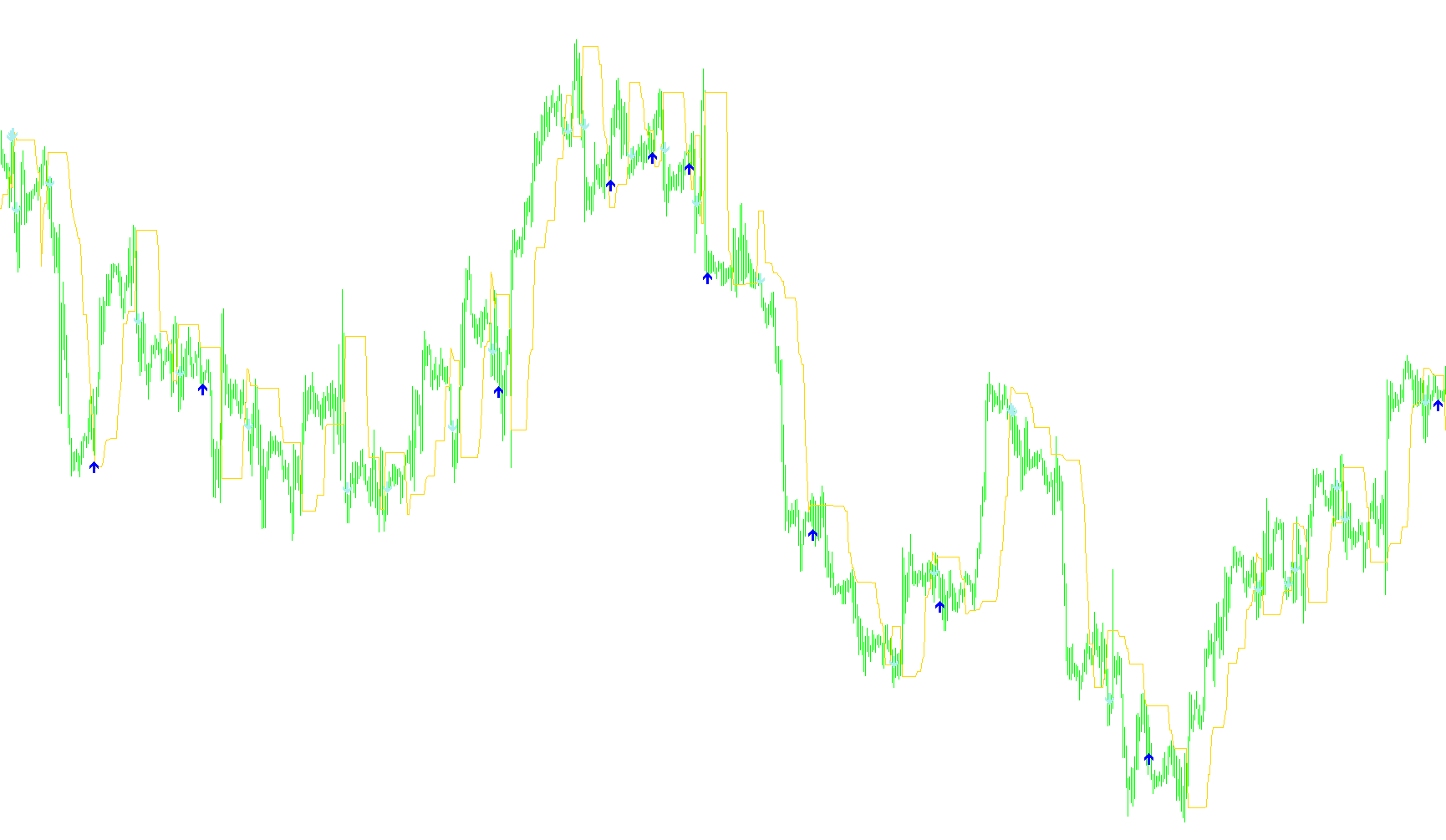
This tool is designed to help traders visualize price trends and identify potential entry points by monitoring the relationship between current market prices and a dynamic "trend line." Unlike static moving averages, this script adjusts itself based on the extreme highs and lows of the market over a specific period.
How the Logic Works
1. Dynamic Trend Tracking The core of the indicator is a reactive trend line that follows the price action. It identifies whether the market is currently in an upward or downward phase:
- Upward Movement: If the price stays above the previous trend level, the tool looks back at the highest prices reached over a set period to establish the "ceiling."
- Downward Movement: If the price falls below the previous trend level, the tool looks back at the lowest prices reached over that same period to establish the "floor."
By constantly recalculating these peaks and troughs, the indicator creates a fluid line that hugs the price action, adapting to volatility rather than remaining fixed.
2. Signal Generation (Buy and Sell) The script monitors how the price interacts with this dynamic line to generate visual alerts on your chart:
- Buy Signals: These are triggered when the price demonstrates a specific "rebound" pattern. Specifically, if the price was previously above the trend line but dips below it and then reacts, the tool places a gold/yellow arrow below the candle. This suggests a potential area where the market might be finding support.
- Sell Signals: These are triggered when the price shows a "breakdown" pattern. If the price moves from below the trend line to above it (or vice versa in a specific sequence), the tool places a red arrow above the candle, highlighting a potential overhead resistance or a shift in momentum.
Key Customization Options
The behavior of the script can be fine-tuned using three main parameters:
- Max Period: This determines the "memory" of the indicator. A higher number means the trend line will be smoother and react more slowly to minor price fluctuations, while a lower number makes it highly sensitive to immediate price changes.
- Percent: This acts as a small buffer or offset, ensuring that the signals are not triggered by tiny, insignificant "pips" of movement, providing a layer of stability to the alerts.
- Visual Alerts: The indicator automatically paints three distinct elements on your chart: the main trend line and two different types of arrows for Buy and Sell opportunities.
//+------------------------------------------------------------------+
//|                                                      dynamic.mq4 |
//|                      Copyright © 2006, MetaQuotes Software Corp. |
//|                                        http://www.metaquotes.net |
//+------------------------------------------------------------------+
#property copyright "Copyright © 2006, MetaQuotes Software Corp."
#property link      "http://www.metaquotes.net"

#property indicator_chart_window
#property indicator_buffers 3
#property indicator_color1 Gold // BUY signal
#property indicator_color2 Yellow // BUY signal
#property indicator_color3 Red // SELL signal
//----Indicator Buffers--------------------------------------------+
double DynamicLineTrend []; // Data buffer for dynamic line trend
double BUYSignals []; // Data buffer for BUY signals

double SELLSignals []; // Data buffer for SELL signals //----User defines-------------------------------------------------
extern int Percent=1; // Percent dynamic channel  15  Main Trend 10
extern int MaxPeriod=14; // 12 FOR H1 Maximal period for calculate trend 50 Main Trend 89
 //----Variables----------------------------------------------------+
 int Shift=0;  // Current bar for calculate trend //
//+------------------------------------------------------------------+
//| Custom indicator initialization function                        |
//+------------------------------------------------------------------+
 int init ()
 {
SetIndexStyle (0, DRAW_LINE);
SetIndexBuffer(0, DynamicLineTrend);

SetIndexStyle (1, DRAW_ARROW);
SetIndexArrow (1,233);
SetIndexBuffer(1, BUYSignals);

SetIndexStyle (2, DRAW_ARROW);
SetIndexArrow (2,234);
SetIndexBuffer(2, SELLSignals);
 return (0);
 }
//-------------------------------------------------------------------+

// +------------------------------------------------------------------+
// | Custom indicator iteration function                              |
// +------------------------------------------------------------------+
 int start ()
 {
// Get digits of Symbol
 double point=MarketInfo (Symbol (), MODE_POINT);
// Set count bars for calculate trend
 int Counted_Bars=IndicatorCounted ()-MaxPeriod;
//----Calculation DynamicLineTrend---------------------------------+
   for ( Shift = Counted_Bars; Shift>=0; Shift--)
  {
// Calculate of maximal period
      if (Close [Shift] <DynamicLineTrend [Shift+1])
         {
            // Calculate Upper trend
            DynamicLineTrend [Shift] =Close [Highest (NULL, 0, MODE_CLOSE, MaxPeriod, Shift+1)]-Percent*point;
         }

      if (Close [Shift]>=DynamicLineTrend [Shift+1])
         {
            // Calculate Down trend
               DynamicLineTrend [Shift] =Close [Lowest (NULL, 0, MODE_CLOSE, MaxPeriod, Shift+1)] +Percent*point;
         }

// Checkcrosses DynamicLineTrend and Price
      if (Close [Shift+3]> DynamicLineTrend [Shift+2])
      if (Close [Shift+2] <DynamicLineTrend [Shift+3])
             BUYSignals [Shift] =Low [Shift]-10*point;
         else
             BUYSignals [Shift] =0;

         else
             BUYSignals [Shift] =0;

      if (Close [Shift+2] <DynamicLineTrend [Shift+1])
      if (Close [Shift+2]> DynamicLineTrend [Shift+3])
             SELLSignals [Shift] =High [Shift]-10*point;
         else
             SELLSignals [Shift] =0;

         else
             SELLSignals [Shift] =0;
   }
//-------------------------------------------------------------------+
return (0);
}
// ++++++++++++++++++++++++++++++++++++++++++++++++++++++++++++++++++++
Comments