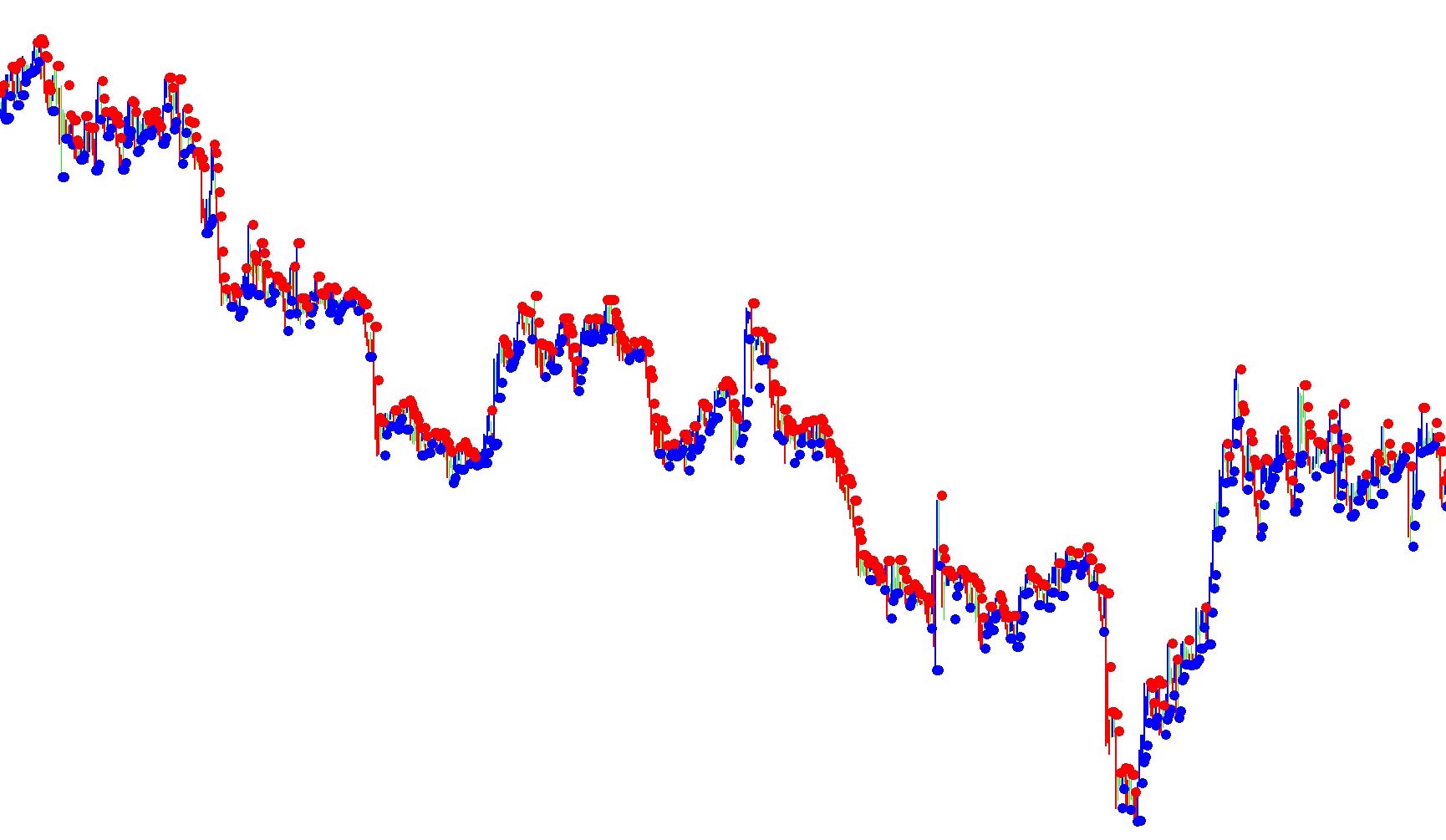
The Darma System Indicator is a technical analysis tool designed to help traders identify potential entry points in the financial markets by monitoring price momentum and "mood" shifts. It simplifies complex market data into visual cues, specifically focusing on the relationship between current price action and volatility trends.
Core Logic Overview
The indicator operates by identifying specific structural shifts in price movement. It looks for moments where the trend potentially reverses or consolidates, signaling a change in market sentiment. These signals are presented to the user through three primary visual elements: Red Dots, Blue Dots, and colored Bars.
Signal Interpretation
The logic follows a two-step verification process to determine when a trade is viable:
1. Identifying Market Mood (The Dots) The indicator monitors "stop dots" to gauge the immediate sentiment of the market:
- Bullish Sentiment: When a red dot (positioned above the price) switches to a blue dot (positioned below the price), it indicates that the "mood" is shifting toward a potential buy.
- Bearish Sentiment: When a blue dot (below the price) switches to a red dot (above the price), it indicates the mood is shifting toward a potential sell.
2. Confirming the Entry (The Bars) A change in dots serves as a warning, but the indicator requires confirmation via the candle bars before a trade should be considered:
- For Buy Trades: Once a bullish mood is detected (blue dot), the user must wait for the current price bar to turn blue. The logic dictates that the trader should wait for this blue bar to close completely before entering.
- For Sell Trades: Once a bearish mood is detected (red dot), the user must wait for the current price bar to turn red. Again, the trade is only validated once that red bar has finished closing.
Execution Strategy
The script translates these visual signals into a specific execution plan for the trader:
- Buy Entry: After a blue bar closes, the intended entry point is 10 to 15 pips above the high of that specific bar.
- Sell Entry: After a red bar closes, the intended entry point is 10 to 15 pips below the low of that specific bar.
In summary, the Darma System acts as a filter—using dots to identify the shift in market "mood" and bars to confirm the completion of that move, providing a structured set of rules for identifying high-probability entry zones.
//+------------------------------------------------------------------+
//|                                Darma System Indicator (beta).mq4 |
//|                                                tonyc2a@yahoo.com |
//|                                                                  |
//+------------------------------------------------------------------+
/*README
   This indicator is supposed to be a conversion of Darma's set of indicators from MT3 to MT4.
   This conversion is not exactly the same though. In the MT3 version, the indicators were split up between 4 separate custom indicator files.
   This MT4 version has all the logic combined into one file. Due to this consolidation, some of the logic did not translate exactly as intended.
   Also, I only did a direct code translation. Prior to looking at the code in the MT3 files, I had no understanding of the logic behind the indicator files.
   If someone could provide the logic in human language, I might be able to make this indicator behave more properly as well as be a little more programmatically elegant.
   Test this indicator out according to Darma's original rules and see how it does for you.

   Darma's Rules:
   BUY:
   1. When red stop dot (above price) becoming a blue stop dot (below price), the mood is ready for a buy.
   3. Wait for the bar becoming blue. Sometime it happens in the same time, but sometime need to wait.
   4. After you have a blue bar, Wait that blue bar closed completely.
   5. Then place order to buy at 10-15 pips above the high of that blue bar.

   SELL:
   1. When bule stop dot (below price) becoming a red stop dot (above price), the mood is ready for a sell.
   3. Wait for the bar becoming red. Sometime it happens in the same time, but sometime need to wait.
   4. After you have a red bar, Wait that red bar closed completely.
   5. Then place order to sell at 10-15 pips below the low of that red bar.

   PS. This code is very ugly and inelegant. I would like to fix this by getting system rules in english.

   - tonyc2a@yahoo.com
*/
#property copyright "tonyc2a@yahoo.com"
#property link      ""
//----
#property indicator_chart_window
#property indicator_buffers 4
//---- input parameters
extern int WingDings_Symbol=108;
//---- buffers
double Buffer1[];
double Buffer2[];
double Buffer3[];
double Buffer4[];
double Buffer5[];
double Buffer6[];
//+------------------------------------------------------------------+
//| Custom indicator initialization function                         |
//+------------------------------------------------------------------+
int init()
  {
//---- indicators
   SetIndexStyle(0,DRAW_HISTOGRAM,STYLE_SOLID,2,Blue);
   SetIndexBuffer(0,Buffer1);
   SetIndexLabel(0,"Blue Bar");
   SetIndexStyle(1,DRAW_HISTOGRAM,STYLE_SOLID,2,Red);
   SetIndexBuffer(1,Buffer2);
   SetIndexLabel(1,"Red Bar");
   SetIndexStyle(2,DRAW_ARROW,STYLE_DOT,2,Blue);
   SetIndexBuffer(2,Buffer3);
   SetIndexLabel(2,"Blue Dot");
   SetIndexArrow(2,WingDings_Symbol);
   SetIndexStyle(3,DRAW_ARROW,STYLE_DOT,2,Red);
   SetIndexBuffer(3,Buffer4);
   SetIndexLabel(3,"Red Dot");
   SetIndexArrow(3,WingDings_Symbol);
   //SetIndexStyle(4,DRAW_SECTION,STYLE_SOLID,1,Blue);
   //SetIndexBuffer(4,Buffer5);
   //SetIndexLabel(4,"Blue");
   //SetIndexStyle(5,DRAW_SECTION,STYLE_SOLID,1,Red);
   //SetIndexBuffer(5,Buffer6);
   //SetIndexLabel(5,"Red");
//----
   return(0);
  }
//+------------------------------------------------------------------+
//| Custor indicator deinitialization function                       |
//+------------------------------------------------------------------+
int deinit()
  {
//---- TODO: add your code here
//----
   return(0);
  }
//+------------------------------------------------------------------+
//| Custom indicator iteration function                              |
//+------------------------------------------------------------------+
int start()
  {
   int    counted_bars=IndicatorCounted();
//---- TODO: add your code here
   int adjustment=0; //change this value to make the indicator behave slightly differently. valid values are 0-4.
   int periods=3;
   int extremes=0;
   double smin, smax, SsMax, SsMin, pivothi, pivotlo, margins;
   bool flag1, flag2;
     for(int i=0;i<Bars;i++)
     {
        if(extremes!=0)
        {
         SsMax=High[Highest(NULL,0,MODE_OPEN,periods,i+adjustment)];
         SsMin=Low[Lowest(NULL,0,MODE_OPEN,periods,i+adjustment)];
        }
        else{
         SsMax=Open[Highest(NULL,0,MODE_OPEN,periods,i+adjustment)];
         SsMin=Open[Lowest(NULL,0,MODE_OPEN,periods,i+adjustment)];
        }
      smin=SsMin+(SsMax-SsMin)*margins/100;
      smax=SsMax-(SsMax-SsMin)*margins/100;
      pivothi=((2*High[i])+Low[i]+(2*Close[i]))/5;
      pivotlo=(High[i]+(2*Low[i])+(2*Close[i]))/5;
//----
      if(pivotlo>smin && pivothi>smax) flag1=true; else flag1=false;
      if(pivothi<smax && pivotlo<smin) flag2=true; else flag2=false;
        if(flag1)
        {
         Buffer1[i]=High[i];
         Buffer2[i]=Low[i];
        }
        if(flag2)
        {
         Buffer1[i]=Low[i];
         Buffer2[i]=High[i];
        }
      double sig=iSAR(NULL,0,0.5,1,i);
      if(sig<Low[i]) Buffer3[i]=sig;
      if(sig>High[i]) Buffer4[i]=sig;
         /*
         double sig2=iSAR(NULL,0,1,0.2,i);
         if(sig2<Low[i]) {Buffer5[i]=sig2; Buffer6[i]=-1;}
         if(sig2>High[i]) {Buffer6[i]=sig2; Buffer5[i]=-1;}
         */
     }
//end for
//----
   return(0);
  }
//+------------------------------------------------------------------+
Comments