StepMA_v7a
Download script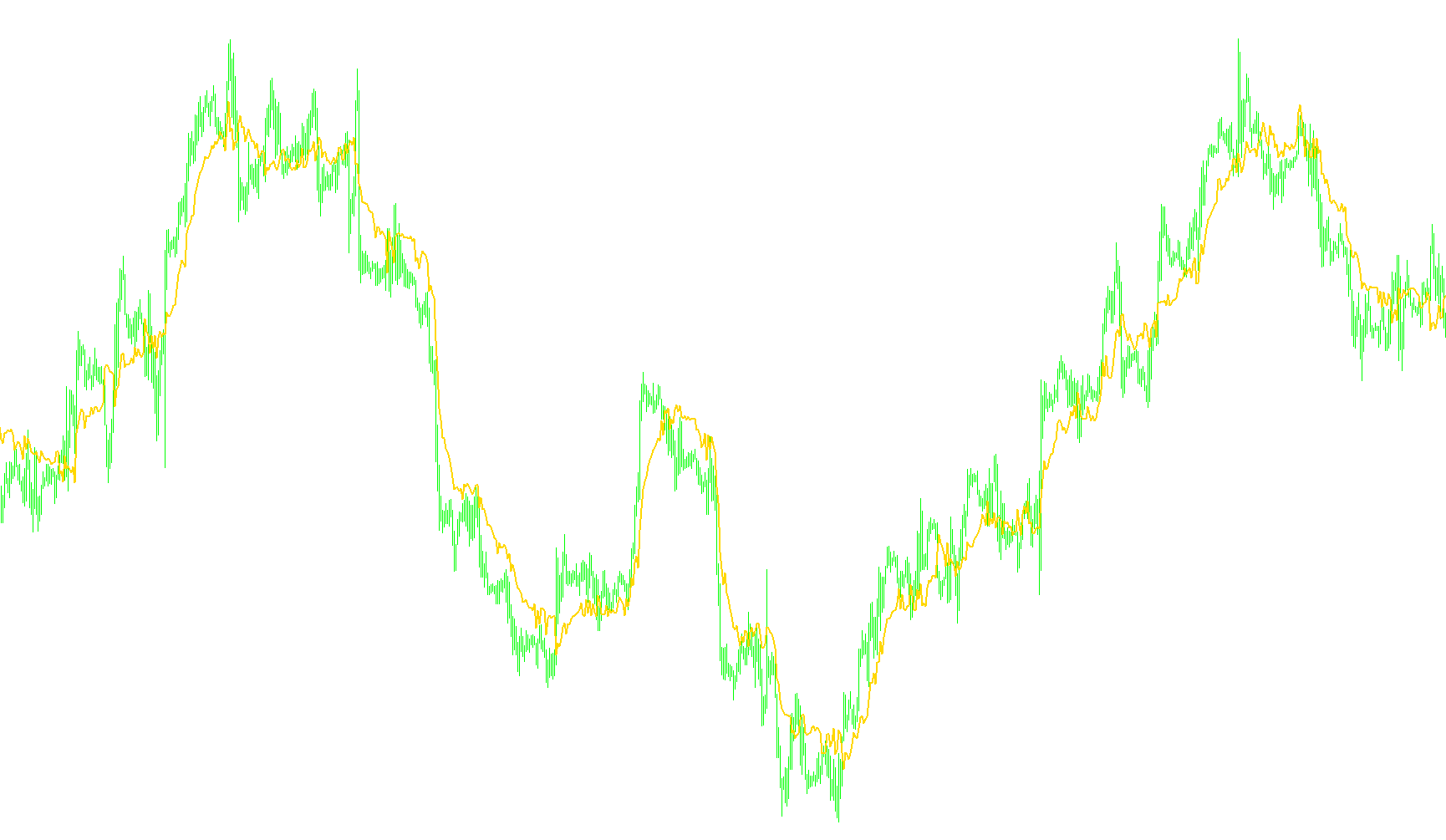
The StepMA (Step Moving Average) is a sophisticated technical analysis tool designed to track market trends by adapting its behavior based on market volatility and price momentum. Unlike standard moving averages that smooth out price data into a continuous curve, the StepMA focuses on identifying distinct "steps" or levels within the market movement.
Core Logic and Functionality
1. Dynamic Volatility Adaptation The tool does not treat all market conditions equally. It employs a calculation mechanism (based on Keltner Channels) to measure the current price range relative to its historical behavior. By calculating the distance between high and low prices over a specific period, the script determines how much "room" the market is moving in. This allows the indicator to adjust its sensitivity automatically; it becomes more stable during quiet periods and reacts more decisively during high-volatility spikes.
2. Adaptive Step Calculation A primary feature of this logic is the "Step Size." Instead of a fixed movement, the indicator calculates a dynamic step based on several factors:
- Average True Range (ATR): It analyzes the historical highs and lows to establish a baseline for price fluctuations.
- Sensitivity Factor: Users can define a multiplier that dictates how aggressively the line should react to new price information.
- Automatic Scaling: If no fixed step is provided, the logic automatically scales the movement based on the maximum and minimum ranges identified in recent history.
3. Trend Detection and Directional Logic The script tracks the market trend by comparing current closing prices against "upper" and "lower" boundaries.
- Breakout Identification: When the price closes significantly above the upper boundary, a bullish (upward) trend is initiated. Conversely, a close below the lower boundary triggers a bearish (downward) trend.
- Step Progression: Once a trend is established, the indicator moves in fixed "steps" in that direction. It only "locks" into a new level when the price reaches a specific threshold, preventing the line from flickering or reacting to minor market noise.
4. High/Low Sensitivity Toggle The logic includes a specific mode to switch between using "Typical Prices" (a blend of high, low, and close) and pure "High/Low" data. The High/Low mode is designed for heightened sensitivity, as it reacts more directly to the extreme reaches of price action rather than just where the price eventually settles.
5. Visual Representation The script provides multiple ways to visualize this data on a chart:
- Single Line: A unified line showing the current step level.
- Dual Buffer (Up/Down): Separate lines or indicators that highlight the upward and downward movements independently.
- Color Coding: The logic can be configured to change colors dynamically based on whether the trend is currently bullish or bearish, providing an immediate visual cue for traders regarding market sentiment.
Summary for the User
In essence, this script acts as a "smart" moving average. It ignores minor fluctuations and only moves when the price makes a significant enough move to justify a new "step." By factoring in current volatility, it ensures that the trend line remains relevant regardless of whether the market is moving slowly or swinging wildly.
//+------------------------------------------------------------------+
//|                                                    StepMA_v7.mq4 |
//|                                Copyright © 2006, TrendLaboratory |
//|            http://finance.groups.yahoo.com/group/TrendLaboratory |
//|                                   E-mail: igorad2003@yahoo.co.uk |
//+------------------------------------------------------------------+
#property copyright "Copyright © 2006, TrendLaboratory"
#property link      "http://finance.groups.yahoo.com/group/TrendLaboratory"

#property indicator_chart_window
#property indicator_buffers 3
#property indicator_color1 Crimson
#property indicator_color2 Blue
#property indicator_color3 Red

//---- input parameters
extern int     Length      = 10;      // Volty Length
extern double  Kv          = 1.0;     // Sensivity Factor
extern int     StepSize    = 0;       // Constant Step Size (if need)
extern int     MA_Mode     = 0;       // Volty MA Mode : 0-SMA, 1-LWMA
extern int     Advance     = 0;       // Offset
extern double  Percentage  = 0;       // Percentage of Up/Down Moving
extern bool    HighLow     = false;   // High/Low Mode Switch (more sensitive)
extern int     ColorMode   = 0;       // Color Mode Switch
extern int     BarsNumber  = 1000;
extern int     period      = 10;

//---- indicator buffers
double LineBuffer[];
double UpBuffer[];
double DnBuffer[];
double smin[];
double smax[];
double trend[];

double StepMA=0, ATR0=0,ATRmax=-100000,ATRmin=1000000;
int limit;

//---- StepSize Calculation
   double get_current_Kv(int shift){
      double u,l;
      find_keltner_channels(shift,u,l);
      double range = (u-l)/Point;
      double c = (Close[shift]-l)/Point;
      if(range!=0)
         return (MathAbs(0.5 - c / range) + Kv);
      return (Kv);
   }

   void find_keltner_channels(int shift,double &u,double &l) {
      double sum=0;
      for (int x=shift;x<(shift+period);x++) sum += High[x]-Low[x];
      double avg  = sum/period;

      double middle = iMA(NULL, 0, period, 0, MODE_SMA, PRICE_TYPICAL, shift);

      u = middle + avg;
      l = middle - avg;
   }

   double StepSizeCalc ( int Len, double Km, int Size, int k)
   {

   double result;
   if( Size==0 )
   {
        double AvgRange=0;
	     for (int i=Len-1;i>=0;i--)
	     {
            if(MA_Mode==0) double alfa= 1.0; else alfa= 1.0+1.0*(Len-i)/Len;
            AvgRange+= alfa*(High[k+i]-Low[k+i]);
        }
	     ATR0 = AvgRange/Len;

	if (ATR0>ATRmax) ATRmax=ATR0;
	if (ATR0<ATRmin) ATRmin=ATR0;

	result=MathRound(0.5*Km*(ATRmax+ATRmin)/Point);
	}
	else
	result=Km*StepSize;

   return(result);
   }

//---- StepMA Calculation

   double StepMACalc (bool HL, double Size, int k)
   {
   int counted_bars=IndicatorCounted();
   double result;

   if (HL)
	  {
	  smax[k]=Low[k]+2.0*Size*Point;
	  smin[k]=High[k]-2.0*Size*Point;
     }
	else
	  {
	  smax[k]=Close[k]+2.0*Size*Point;
	  smin[k]=Close[k]-2.0*Size*Point;
	  }
	  if (counted_bars==0){smax[limit+1]=smax[limit];smin[limit+1]=smin[limit];trend[limit+1]=0;}

	  trend[k]=trend[k+1];

	  if (Close[k]>smax[k+1]) trend[k]=1;

	  if (Close[k]<smin[k+1]) trend[k]=-1;

	  if(trend[k]>0)
	  {
	  if(smin[k]<smin[k+1]) smin[k]=smin[k+1];
	  result=smin[k]+Size*Point;
	  }
	  else
	  {
	  if(smax[k]>smax[k+1]) smax[k]=smax[k+1];
	  result=smax[k]-Size*Point;
	  }
     //Print (" k=",k," trend=",trend[k], " res=",result," Smax=", smax[k], " Smin=", smin[k]);


     return(result);
     }
//+------------------------------------------------------------------+
//| Custom indicator initialization function                         |
//+------------------------------------------------------------------+
  int init()
  {
   string short_name;
//---- indicator line
   IndicatorBuffers(6);

   SetIndexStyle(0,DRAW_LINE,STYLE_SOLID,2);
   SetIndexStyle(1,DRAW_LINE);
   SetIndexStyle(2,DRAW_LINE);

   SetIndexArrow(1,159);
   SetIndexArrow(2,159);

   SetIndexBuffer(0,LineBuffer);
   SetIndexBuffer(1,UpBuffer);
   SetIndexBuffer(2,DnBuffer);

   SetIndexShift(0,Advance);
   SetIndexShift(1,Advance);
   SetIndexShift(2,Advance);

   SetIndexBuffer(3,smin);
   SetIndexBuffer(4,smax);
   SetIndexBuffer(5,trend);

//---- name for DataWindow and indicator subwindow label
   short_name="StepMA("+Length+","+Kv+","+StepSize+")";
   IndicatorShortName(short_name);
   SetIndexLabel(0,short_name);
   SetIndexLabel(1,"UpTrend");
   SetIndexLabel(2,"DownTrend");
//----
   SetIndexDrawBegin(0,Length);
   SetIndexDrawBegin(1,Length);
   SetIndexDrawBegin(2,Length);
//----
   return(0);
   }
//+------------------------------------------------------------------+
//| Custor indicator deinitialization function                       |
//+------------------------------------------------------------------+
int deinit()
  {
//----

//----
   return(0);
  }
//+------------------------------------------------------------------+
//| StepMA_v7                                                        |
//+------------------------------------------------------------------+
int start()
  {
   int shift, counted_bars=IndicatorCounted();

   if ( BarsNumber > 0 ) int Nbars=BarsNumber; else Nbars=Bars;
   if ( counted_bars > 0 )  limit=Nbars-counted_bars;
   if ( counted_bars < 0 )  return(0);
   if ( counted_bars ==0 )  limit=Nbars-Length-1;

	for(shift=limit;shift>=0;shift--){
	  int Step = StepSizeCalc( Length, get_current_Kv(shift)/*Kv*/, StepSize, shift);
	  Comment (" StepSize= ", Step);
	  StepMA = StepMACalc ( HighLow, Step, shift)+Percentage/100.0*Step*Point;
	  if ( ColorMode == 0)
	     LineBuffer[shift]=StepMA;
	  else if ( ColorMode == 1){
	     if ( trend[shift]>0 ) {
	        UpBuffer[shift]=StepMA-Step*Point;DnBuffer[shift]=EMPTY_VALUE;
	        }
        else if ( trend[shift]<0 ) {
           DnBuffer[shift]=StepMA+Step*Point;UpBuffer[shift]=EMPTY_VALUE;
           }
	     }
	  else if ( ColorMode == 2){
	     if (trend[shift]>0){
	        UpBuffer[shift]=StepMA;
	        if ( trend[shift+1] < 0 ) UpBuffer[shift+1] = DnBuffer[shift+1];
	        DnBuffer[shift]=EMPTY_VALUE;
	        }
	     else if (trend[shift]<0){
           DnBuffer[shift]=StepMA;
	        if ( trend[shift+1] > 0 ) DnBuffer[shift+1] = UpBuffer[shift+1];
	        UpBuffer[shift]=EMPTY_VALUE;
	        }
	     }
     else{
	     UpBuffer[shift]=EMPTY_VALUE; DnBuffer[shift]=EMPTY_VALUE;
	     }
	  }
	return(0);
 }
Comments