InstantaneousTrendline_alert
Download script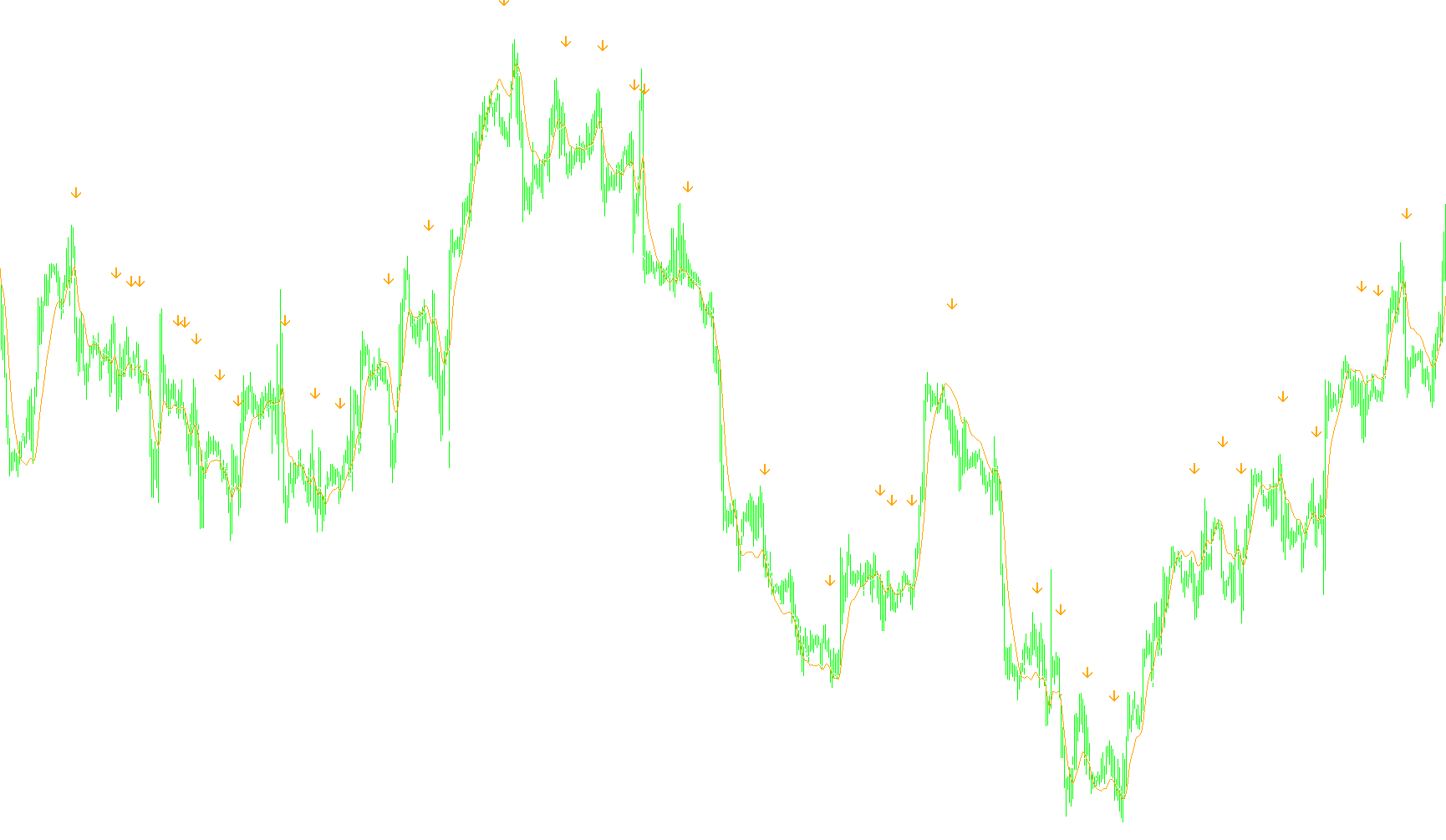
Overview
The Instantaneous Trendline is a technical analysis tool designed to help traders visualize and identify momentum shifts in the financial markets. Based on algorithmic theories from "Cybernetics Analysis for Stock and Futures," it aims to filter out market noise to provide a clearer picture of the underlying price trend.
Core Logic and Components
The script functions by analyzing three distinct layers of data to help users make informed trading decisions:
1. The Trendline (Primary Visualization)
The tool calculates an "Instantaneous Trendline," which is a smoothed representation of price action. Rather than just following every small tick up or down, it uses a specific mathematical formula—controlled by a sensitivity setting called Alpha—to blend recent high and low prices into a continuous line. This helps the user see the general "flow" of the market at any given moment.
2. The Trigger (Momentum Detection)
Alongside the main trendline, the script calculates a secondary "Trigger" value. While the main line shows where the price is trending, the trigger is designed to detect the velocity or momentum of that trend. It compares current values against previous ones to identify if the trend is gaining strength, losing steam, or preparing for a reversal.
3. Signal Generation (Arrows and Alerts)
The most practical use of this script is its ability to provide visual and auditory signals:
- Cross-Over Detection: The script constantly monitors the relationship between the Trendline and the Trigger. When the Trigger crosses over the Trendline, it indicates a significant shift in momentum.
- Visual Cues: When these crossovers occur, the script automatically places arrows on your chart (White for upward trends, Orange for downward trends).
- Smart Alerts: If you have enabled alerts, the system will notify you immediately when a crossover occurs. To prevent "alert fatigue," the script includes a timing mechanism that ensures you are only notified once per specific interval (based on your chosen timeframe), preventing the same signal from repeating multiple times.
Key Features for the User
- Adaptive Scaling: The tool automatically adjusts its internal calculations and "clearance" distances based on the timeframe you are viewing (e.g., it behaves differently on a 1-minute chart versus a Daily chart).
- Customizable Sensitivity: By adjusting the Alpha value, traders can choose how "smooth" or "reactive" they want the trendline to be.
- Real-Time Monitoring: The script works in real-time, updating the trend and identifying signals as new price data arrives.
//+------------------------------------------------------------------+
//|                                       InstantaneousTrendline.mq4 |
//|                                                                  |
//| Instantaneous Trendline                                          |
//|                                                                  |
//| Algorithm taken from book                                        |
//|     "Cybernetics Analysis for Stock and Futures"                 |
//| by John F. Ehlers                                                |
//|                                                                  |
//|                                              contact@mqlsoft.com |
//|                                          http://www.mqlsoft.com/ |
//|                                                                  |
//|                                     Recoded by:                  |
//|                                     "Wylie" dazzle.html@live.com |
//+------------------------------------------------------------------+

#property copyright "Coded by Witold Wozniak"
#property link      "www.mqlsoft.com"

#property indicator_chart_window
#property indicator_buffers 4
#property indicator_color1 Orange
#property indicator_color2 White
#property indicator_level1 0

extern color    Phase1color   = White;
extern color    Phase2color   = Orange;
extern double   Alpha         = 0.07;
extern bool     EnableAlerts  = true;
extern bool     EnableArrows  = true;
extern int      ArrowUPsize   = 1;
extern int      ArrowDNsize   = 1;
extern color    ArrowUPcolor  = White;
extern color    ArrowDNcolor  = Orange;

double          ITrend[],Trigger[],CrossUp[],CrossDn[],Clearance;
int             buffers = 0,MinBars = 0,AST;
string          Chart;
static datetime AlertX[2];

/*+-------------------------------------------------------------------+
  | InstantaneousTrendline Initialization                             |
  +-------------------------------------------------------------------+*/

int init()
{
 MinBars = 20;
 IndicatorBuffers(4);
 IndicatorShortName("Instantaneous Trendline [" + DoubleToStr(Alpha, 2) + "]");

 // Index Buffer 0

 SetIndexBuffer(0,ITrend);
 SetIndexLabel(0,"Instantaneous Trendline");
 SetIndexStyle(0,DRAW_LINE,STYLE_SOLID,1,Phase1color);
 SetIndexShift(0,0);
 SetIndexEmptyValue(0,EMPTY_VALUE);
 SetIndexDrawBegin(0,MinBars);

 // Index Buffer 1

 SetIndexBuffer(1,Trigger);
 SetIndexStyle(1,DRAW_LINE,STYLE_SOLID,1,Phase2color);
 SetIndexLabel(1,"Trigger");
 SetIndexShift(1,0);
 SetIndexEmptyValue(1,EMPTY_VALUE);
 SetIndexDrawBegin(1,MinBars);

 // Index Buffer 2

 SetIndexBuffer(2,CrossUp);
 SetIndexStyle(2,DRAW_ARROW,STYLE_SOLID,ArrowUPsize,ArrowUPcolor);
 SetIndexLabel(2,"ArrowUP");
 SetIndexShift(2,0);
 SetIndexEmptyValue(2,EMPTY_VALUE);
 SetIndexArrow(2,225);
 SetIndexDrawBegin(2,MinBars);

 // Index Buffer 3

 SetIndexBuffer(3,CrossDn);
 SetIndexStyle(3,DRAW_ARROW,STYLE_SOLID,ArrowDNsize,ArrowDNcolor);
 SetIndexLabel(3,"ArrowDN");
 SetIndexShift(3,0);
 SetIndexEmptyValue(3,EMPTY_VALUE);
 SetIndexArrow(3,226);
 SetIndexDrawBegin(3,MinBars);

                                      // The "Clearance" variable below sets the distance from the trendline to the arrows...
                                      // It can be adjusted by the user to their own preference...
 switch(Period())
     {case PERIOD_M1:  Chart = "M1";  Clearance = 0.0003; AST =      59; break;
      case PERIOD_M5:  Chart = "M5";  Clearance = 0.0007; AST =     259; break;
      case PERIOD_M15: Chart = "M15"; Clearance = 0.0011; AST =     899; break;
      case PERIOD_M30: Chart = "M30"; Clearance = 0.0018; AST =    1799; break;
      case PERIOD_H1:  Chart = "H1";  Clearance = 0.0027; AST =    3599; break;
      case PERIOD_H4:  Chart = "H4";  Clearance = 0.0038; AST =   14399; break;
      case PERIOD_D1:  Chart = "D1";  Clearance = 0.0070; AST =   86399; break;
      case PERIOD_W1:  Chart = "W1";  Clearance = 0.0130; AST =  604799; break;
      case PERIOD_MN1: Chart = "MN1"; Clearance = 0.0260; AST = 2591999; break;}

 return (0);
} // int init()

/*+-------------------------------------------------------------------+
  | InstantaneousTrendline Main cycle                                 |
  +-------------------------------------------------------------------+*/

int start()
{
 if(Bars <= MinBars){return (0);}
 int countedBars = IndicatorCounted(),c,limit = Bars - countedBars - 1;

 if(countedBars < 0){return (-1);}
 if(countedBars > 0){countedBars--;}

 for(c = limit; c >= 0; c--)
     {ITrend[c] = (Alpha - (Alpha * Alpha * 0.25)) * ((High[c]   + Low[c])   * 0.5) +
                  (0.5 * Alpha * Alpha)            * ((High[c+1] + Low[c+1]) * 0.5) -
                  (Alpha - 0.75 * Alpha * Alpha)   * ((High[c+2] + Low[c+2]) * 0.5) +
                  2.0 * (1.0 - Alpha) * ITrend[c+1] - (1.0 - Alpha) * (1.0 - Alpha) * ITrend[c+2];

      if(c > Bars - 8)
         {ITrend[c] = (((High[c]   + Low[c])   * 0.5)  + 2.0 *
                       ((High[c+1] + Low[c+1]) * 0.5)  +
                       ((High[c+2] + Low[c+2]) * 0.5)) * 0.25;}

      Trigger[c] = 2.0 * ITrend[c] - ITrend[c + 2];

      double b0 = Trigger[c],b1 = Trigger[c+1],
             r0 = ITrend[c], r1 = ITrend[c+1];

      if(EnableArrows)
         {if(b0 > r0 && b1 < r1){CrossUp[c] = r0 - Clearance;}else{CrossUp[c] = EMPTY_VALUE;}
          if(b0 < r0 && b1 > r1){CrossDn[c] = r0 + Clearance;}else{CrossDn[c] = EMPTY_VALUE;}}

     } // for(c = limit; c >= 0; c--)

 if(EnableAlerts)
    {if(b0 > r0 && b1 < r1)
        {sendAlert(0,(getDateTime()+" "+Symbol()+" "+Chart+" InstantaneousTrendline signals up trend crossing."));}
     if(b0 < r0 && b1 > r1)
        {sendAlert(1,(getDateTime()+" "+Symbol()+" "+Chart+" InstantaneousTrendline signals down trend crossing."));}}

 return (0);
} // int start()

/*+-------------------------------------------------------------------+
  | End InstantaneousTrendline Main cycle                             |
  +-------------------------------------------------------------------+*/


/*+-------------------------------------------------------------------+
  | Wylie's support functions                                         |
  +-------------------------------------------------------------------+*/

/*+-------------------------------------------------------------------+
  | *** Alert processing function                                     |
  +-------------------------------------------------------------------+*/

void sendAlert(int AlertNum,string AlertText)
{
 if(TimeCurrent() > AlertX[AlertNum] + AST)
    {AlertX[AlertNum] = TimeCurrent();
                                        /* Add a sound file here if you want another form of alert...
                                           The sound file must be located in the MT4 "sounds" file folder
                                           and must be a .wav format file. Also remove the // characters before
                                           the PlaySound instruction.  The Alert command and semicolon can
                                           be removed if the user wishes to remove the alert entirely, if favor
                                           of a sound file... or it can be "commented out" just add // before
                                           the alert instruction. */

//     PlaySound("titleOFyourSoundfile.wav");
     Alert(AlertText);
    } // if(TimeCurrent() > AlertX[AlertNum] + AST)

 return(0);
} // void sendAlert(int AlertNum,string AlertText)

/*+-------------------------------------------------------------------+
  | *** Date/Time display function                                    |
  +-------------------------------------------------------------------+*/

string getDateTime()
{
 string dsplyDateTime = TimeToStr(TimeCurrent(),TIME_DATE|TIME_SECONDS);

 return(dsplyDateTime);
} // string getDateTime()

/*+-------------------------------------------------------------------+
  | End Wylie's support functions                                     |
  +-------------------------------------------------------------------+*/
Comments