info_rectangle_drawing
Download script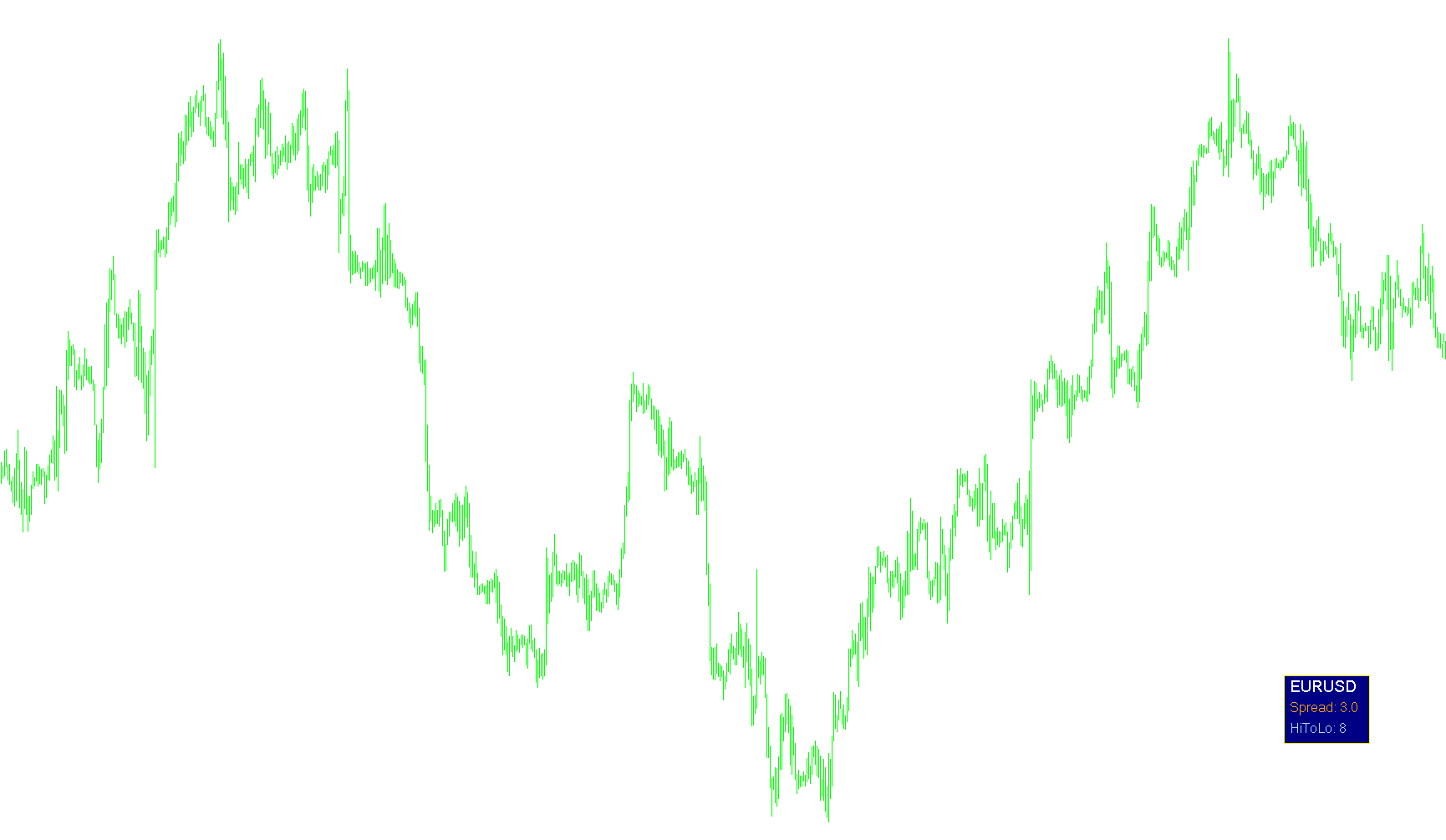
This script is a visual information dashboard designed for the MetaTrader 4 trading platform. Its primary purpose is to display real-time market data in a clean, organized graphical box on your trading chart, allowing you to monitor key statistics at a glance without cluttering your workspace.
Core Functionality
The script creates an interactive "Information Rectangle" on your screen. Instead of just showing raw numbers in a list, it houses the data inside a customizable background box with specific colors, borders, and fonts. It automatically handles the placement of text so that all information is neatly stacked and aligned.
Key Features & Data Displayed
The dashboard is designed to be modular, meaning you can choose which pieces of information to display via the settings:
- Symbol Information: Displays the current trading pair and its timeframe.
- Spread Tracking: Shows the current market spread (the difference between the buy and sell price), which is vital for understanding transaction costs in real-time.
- High/Low Range: Calculates and displays the price range (High to Low) of the current daily candle, giving you a quick sense of today's volatility.
Intelligent Logic & Design
To ensure a smooth user experience, the script employs several "smart" behaviors:
- Dynamic Positioning: You can choose which corner of the chart the dashboard appears in (e.g., bottom-right, top-left, etc.). The script automatically calculates the correct coordinate directions to ensure the text stays perfectly aligned with the chosen corner.
- Auto-Scaling Geometry: One of the more advanced features is how the rectangle handles text size. The script calculates the width of the text being displayed and automatically adjusts the size of the background rectangle to fit that text perfectly. This prevents the box from being too small for long words or unnecessarily large for short ones.
- Real-Time Updates: The script continuously refreshes the data. It uses a timer system to ensure that as market prices change, the Spread and High/Low values update instantly on your screen.
- Clean Workspace Management: When you load the script, it automatically clears any old versions of itself from the chart to prevent "ghost" images. When you remove the script, it cleans up after itself by deleting the dashboard objects, leaving your chart exactly as it was before.
Summary for the User
Think of this as a customizable heads-up display (HUD). It takes raw market data that is usually hidden in menus and pulls it onto your main screen into a stylized, professional box. You can customize colors, fonts, and positions to match your trading style, while the script handles all the math required to keep the layout organized and accurate.
//+------------------------------------------------------------------+
//|                                       info_rectangle_drawing.mq4 |
//|                                         Copyright 2015, eevviill |
//|                                      http://alievtm.blogspot.com |
//+------------------------------------------------------------------+
#property copyright "eevviill"
#property link      "http://alievtm.blogspot.com"
#property version   "2.01"
#property strict
#property indicator_chart_window

extern ENUM_BASE_CORNER info_corner=CORNER_RIGHT_LOWER;

extern string pus1 = "//////////////////////////////////////////////////";
extern string re_s = "Rectangle settings";
extern color rectan_color=clrNavy;
extern int rectan_X = 200;
extern int rectan_Y = 200;
extern ENUM_LINE_STYLE rectan_bord_style=STYLE_SOLID;
extern color rectan_bord_color=clrYellow;
extern int rectan_bord_width=1;

extern string pus2= "//////////////////////////////////////////////////";
extern string t_s = "Text settings";
extern string font_name = "Rockwell";
extern int shift_wordsX = 7;
extern int shift_wordsY = 13;
extern int step_wordsY=25;
ENUM_ANCHOR_POINT text_anchor = ANCHOR_LEFT;
ENUM_ANCHOR_POINT rect_anchor = ANCHOR_LEFT;

extern string pus3 = "//////////////////////////////////////////////////";
extern string wo_s = "Data settings";
extern string SY="//SYMBOL settings//";
extern bool show_symbol_period=true;
extern color symbol_color=clrWhite;
extern int symbol_font_size=14;
extern string SP="//SPREAD settings//";
extern bool show_spread=true;
extern color spread_color=clrOrange;
extern int spread_font_size=12;
extern string HL="//HIGH/LOW settings//";
extern bool show_highLow=true;
extern color highLow_color=clrLightBlue;
extern int highLow_font_size=12;

string identif="infor";
int step_wordsY2;
int shift_wordsX2;
int shift_words_Y2;
int dig4_koef=10;
int max_text_SizeX;
int max_text_2;
bool X_size_ok;
//+------------------------------------------------------------------+
//|                                                                  |
//+------------------------------------------------------------------+
int OnInit()
  {
//delete objects
   string name_delete;
   for(int i=ObjectsTotal()-1;i>=0;i--)
     {
      name_delete=ObjectName(i);
      if(StringFind(name_delete,identif)!=-1) ObjectDelete(name_delete);
     }

//create rectangle
   create_rectangle_f();

//corner change step words
   step_wordsY2=step_wordsY;
   shift_wordsX2=shift_wordsX;
   shift_words_Y2=shift_wordsY;
   switch(info_corner)
     {
      case CORNER_RIGHT_LOWER: break;
      case CORNER_RIGHT_UPPER: {step_wordsY2=-step_wordsY;shift_words_Y2=-shift_wordsY;}
      break;
      case CORNER_LEFT_LOWER: {shift_wordsX2=-shift_wordsX;}
      break;
      case CORNER_LEFT_UPPER: {step_wordsY2=-step_wordsY;shift_wordsX2=-shift_wordsX;shift_words_Y2=-shift_wordsY;}
      break;
     }

   return(INIT_SUCCEEDED);
  }
//+------------------------------------------------------------------+
//|                                                                  |
//+------------------------------------------------------------------+
void OnDeinit(const int reason)
  {
   string name_delete;
   for(int i=ObjectsTotal()-1;i>=0;i--)
     {
      name_delete=ObjectName(i);
      if(StringFind(name_delete,identif)!=-1) ObjectDelete(name_delete);
     }

  }
//+------------------------------------------------------------------+
//|                                                                  |
//+------------------------------------------------------------------+
int OnCalculate(const int rates_total,const int prev_calculated,const datetime &time[],const double &open[],const double &high[],
                const double &low[],const double &close[],const long &tick_volume[],const long &volume[],const int &spread[])
  {
//for X size get
   if(IsTradeAllowed(Symbol(),TimeCurrent()))
     {
      EventKillTimer();
      All();
     }
   else
      EventSetTimer(1);

   return(rates_total);
  }
//+------------------------------------------------------------------+
//|                                                                  |
//+------------------------------------------------------------------+
void OnTimer()
  {
//all
   All();
  }
//+------------------------------------------------------------------+
//|                                                                  |
//+------------------------------------------------------------------+
void create_rectangle_f()
  {
   string name="rectang1"+identif;
   if(ObjectFind(name)==-1)
     {
      ObjectCreate(0,name,OBJ_RECTANGLE_LABEL,0,0,0);

      ObjectSetInteger(0,name,OBJPROP_XDISTANCE,rectan_X);
      ObjectSetInteger(0,name,OBJPROP_YDISTANCE,rectan_Y);
      ObjectSetInteger(0,name,OBJPROP_ANCHOR,rect_anchor);
      ObjectSetInteger(0,name,OBJPROP_BORDER_TYPE,BORDER_FLAT);
      ObjectSetInteger(0,name,OBJPROP_CORNER,info_corner);
      ObjectSetInteger(0,name,OBJPROP_COLOR,rectan_bord_color);
      ObjectSetInteger(0,name,OBJPROP_BGCOLOR,rectan_color);
      ObjectSetInteger(0,name,OBJPROP_STYLE,rectan_bord_style);
      ObjectSetInteger(0,name,OBJPROP_WIDTH,rectan_bord_width);
      ObjectSetInteger(0,name,OBJPROP_BACK,false);
      ObjectSetInteger(0,name,OBJPROP_SELECTABLE,false);
      ObjectSetInteger(0,name,OBJPROP_SELECTED,false);
      ObjectSetInteger(0,name,OBJPROP_HIDDEN,true);
     }
  }
//+------------------------------------------------------------------+
//|                                                                  |
//+------------------------------------------------------------------+
void X_Y_rectangle_set(int X,int Y)
  {
   string name="rectang1"+identif;

   ObjectSetInteger(0,name,OBJPROP_XSIZE,X);
   ObjectSetInteger(0,name,OBJPROP_YSIZE,Y);
  }
//+------------------------------------------------------------------+
//|                                                                  |
//+------------------------------------------------------------------+
void obj_create_f(string name,string object,int Y_distance,color Color,int size)
  {
   if(ObjectFind(name)==-1)
     {
      ObjectCreate(0,name,OBJ_LABEL,0,0,0);
      ObjectSetInteger(0,name,OBJPROP_CORNER,info_corner);
      ObjectSetInteger(0,name,OBJPROP_FONTSIZE,size);
      ObjectSetString(0,name,OBJPROP_FONT,font_name);
      ObjectSetInteger(0,name,OBJPROP_SELECTABLE,false);
      ObjectSetInteger(0,name,OBJPROP_SELECTED,false);
      ObjectSetInteger(0,name,OBJPROP_HIDDEN,true);
      ObjectSetInteger(0,name,OBJPROP_ANCHOR,text_anchor);
      ObjectSetInteger(0,name,OBJPROP_XDISTANCE,rectan_X-shift_wordsX2);
      ObjectSetInteger(0,name,OBJPROP_YDISTANCE,Y_distance);
      ObjectSetInteger(0,name,OBJPROP_COLOR,Color);
     }
   ObjectSetString(0,name,OBJPROP_TEXT,object);

//text size
   int text_sizeX=int(ObjectGetInteger(0,name,OBJPROP_XSIZE));
   if(text_sizeX==0) X_size_ok=false;
   if(text_sizeX>max_text_SizeX) max_text_SizeX=text_sizeX;
   if(text_sizeX>max_text_2) max_text_2=text_sizeX;
  }
//+------------------------------------------------------------------+
//|                                                                  |
//+------------------------------------------------------------------+
void All()
  {
   int Y_step=rectan_Y-shift_words_Y2;
   X_size_ok=true;
   max_text_2=0;

///1
   if(show_symbol_period) {obj_create_f(identif+Symbol(),Symbol(),Y_step,symbol_color,symbol_font_size);Y_step-=step_wordsY2;}
///2
   if(show_spread) {obj_create_f(identif+"Spread: ","Spread: "+DoubleToString(MarketInfo(Symbol(),MODE_SPREAD)/dig4_koef,1),Y_step,spread_color,spread_font_size);Y_step-=step_wordsY2;}
///3
   if(show_highLow) {obj_create_f(identif+"HiToLo: ","HiToLo: "+DoubleToString((iHigh(Symbol(),PERIOD_D1,0)-iLow(Symbol(),PERIOD_D1,0))/Point/dig4_koef,0),Y_step,highLow_color,highLow_font_size);Y_step-=step_wordsY2;}

//rectangle X Y size
   Y_step+=step_wordsY2;
   if(X_size_ok && max_text_2!=max_text_SizeX) max_text_SizeX=max_text_2;
   X_Y_rectangle_set(max_text_SizeX+shift_wordsX*3,MathAbs(rectan_Y-Y_step)+int(shift_wordsY*1.5));
  }
//+------------------------------------------------------------------+
Comments