iFractals_4all_TF
Download script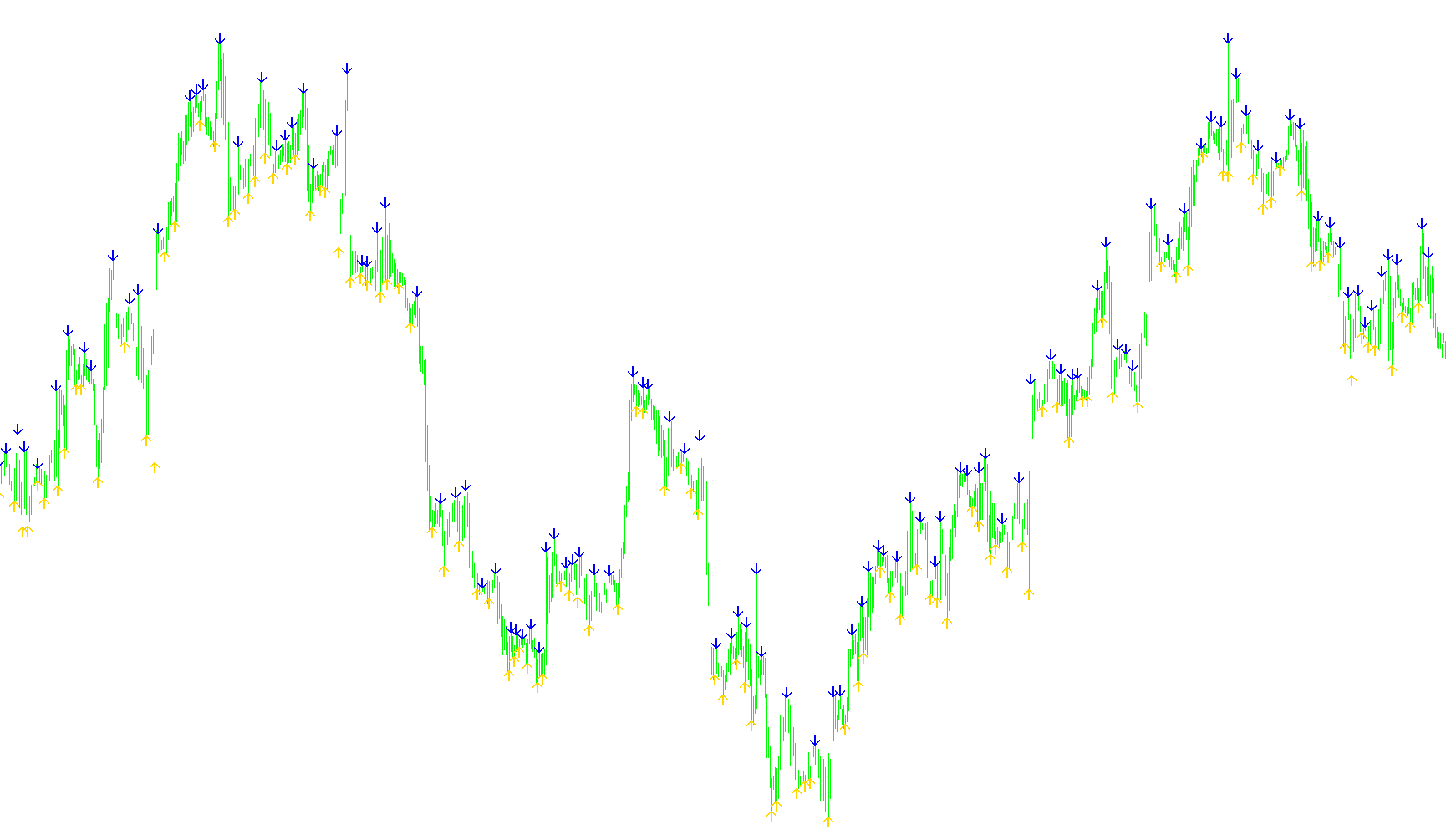
This tool is designed to assist traders by identifying specific price action patterns on a trading chart. It functions as a visual aid that highlights potential "fractal" points—which are often used in technical analysis to identify significant peaks and valleys in market movement.
How the Logic Works
The script scans the current market data to look for two specific types of signals based on the relationship between the price at which a candle opens and the prevailing fractal levels (the high and low extremes of the market).
1. Identifying Downward Pressure (Buy Signals) The tool looks for instances where the opening price of a candle is higher than the "Lower Fractal" level. When this condition is met, it places a visual marker on the chart. This logic essentially seeks to highlight moments where the current entry price is positioned above a recent significant low point in the market history.
2. Identifying Upward Pressure (Sell Signals) Conversely, the tool monitors instances where the opening price of a candle is lower than the "Upper Fractal" level. When this happens, it places a visual marker to indicate a point where the current entry price is positioned below a recent significant high point in the market history.
Key Technical Behaviors
- Visual Markers: Rather than just providing raw numbers, the script translates these calculations into visual arrows (orange for "Buy" signals and blue for "Sell" signals) directly on your trading window.
- Performance Optimization: To ensure your platform remains responsive and smooth, the script is programmed to ignore extremely old historical data. It focuses its calculations on the most relevant recent price action, preventing unnecessary system lag.
- Real-Time Adjustment: The tool automatically calculates these positions based on the current timeframe you are viewing, ensuring that the markers remain relevant as new candles form and prices fluctuate.
In summary, this script acts as an automated scout, filtering through market noise to highlight specific price relationships between opening values and historical highs/lows, helping traders quickly spot potential areas of interest.
//+------------------------------------------------------------------+
//|                                   Indicator: iFractals 4all TF.mq4 |
//|                                       Created with EABuilder.com |
//|                                             http://eabuilder.com |
//+------------------------------------------------------------------+
#property copyright "Created with EABuilder.com"
#property link      "http://eabuilder.com"
#property version   "1.00"
#property description ""

#include <stdlib.mqh>
#include <stderror.mqh>

//--- indicator settings
#property indicator_chart_window
#property indicator_buffers 2

#property indicator_type1 DRAW_ARROW
#property indicator_width1 0
#property indicator_color1 0xFFAA00
#property indicator_label1 "Buy"

#property indicator_type2 DRAW_ARROW
#property indicator_width2 0
#property indicator_color2 0x0000FF
#property indicator_label2 "Sell"

//--- indicator buffers
double Buffer1[];
double Buffer2[];

extern int Shift = 0;
double myPoint; //initialized in OnInit

void myAlert(string type, string message)
  {
   if(type == "print")
      Print(message);
   else if(type == "error")
     {
      Print(type+" | Up Down Signal1 @ "+Symbol()+","+Period()+" | "+message);
     }
   else if(type == "order")
     {
     }
   else if(type == "modify")
     {
     }
  }

//+------------------------------------------------------------------+
//| Custom indicator initialization function                         |
//+------------------------------------------------------------------+
int OnInit()
  {
   IndicatorBuffers(2);
   SetIndexBuffer(0, Buffer1);
   SetIndexEmptyValue(0, 0);
   SetIndexArrow(0, 225);
   SetIndexBuffer(1, Buffer2);
   SetIndexEmptyValue(1, 0);
   SetIndexArrow(1, 226);
   //initialize myPoint
   myPoint = Point();
   if(Digits() == 5 || Digits() == 3)
     {
      myPoint *= 10;
     }
   return(INIT_SUCCEEDED);
  }

//+------------------------------------------------------------------+
//| Custom indicator iteration function                              |
//+------------------------------------------------------------------+
int OnCalculate(const int rates_total,
                const int prev_calculated,
                const datetime& time[],
                const double& open[],
                const double& high[],
                const double& low[],
                const double& close[],
                const long& tick_volume[],
                const long& volume[],
                const int& spread[])
  {
   int limit = rates_total - prev_calculated;
   //--- counting from 0 to rates_total
   ArraySetAsSeries(Buffer1, true);
   ArraySetAsSeries(Buffer2, true);
   //--- initial zero
   if(prev_calculated < 1)
     {
      ArrayInitialize(Buffer1, 0);
      ArrayInitialize(Buffer2, 0);
     }
   else
      limit++;

   //--- main loop
   for(int i = limit-1; i >= 0; i--)
     {
      if (i >= MathMin(5000-1, rates_total-1-50)) continue; //omit some old rates to prevent "Array out of range" or slow calculation
      //Indicator Buffer 1
      if(Open[i] > iFractals(NULL, PERIOD_CURRENT, MODE_LOWER, Shift+i) //Candlestick Open > Fractals
      )
        {
         Buffer1[i] = iFractals(NULL, PERIOD_CURRENT, MODE_LOWER, Shift+i); //Set indicator value at Fractals
        }
      else
        {
         Buffer1[i] = 0;
        }
      //Indicator Buffer 2
      if(Open[i] < iFractals(NULL, PERIOD_CURRENT, MODE_UPPER, Shift+i) //Candlestick Open < Fractals
      )
        {
         Buffer2[i] = iFractals(NULL, PERIOD_CURRENT, MODE_UPPER, Shift+i); //Set indicator value at Fractals
        }
      else
        {
         Buffer2[i] = 0;
        }
     }
   return(rates_total);
  }
//+------------------------------------------------------------------+
Comments