i-Monday_Sig
Download script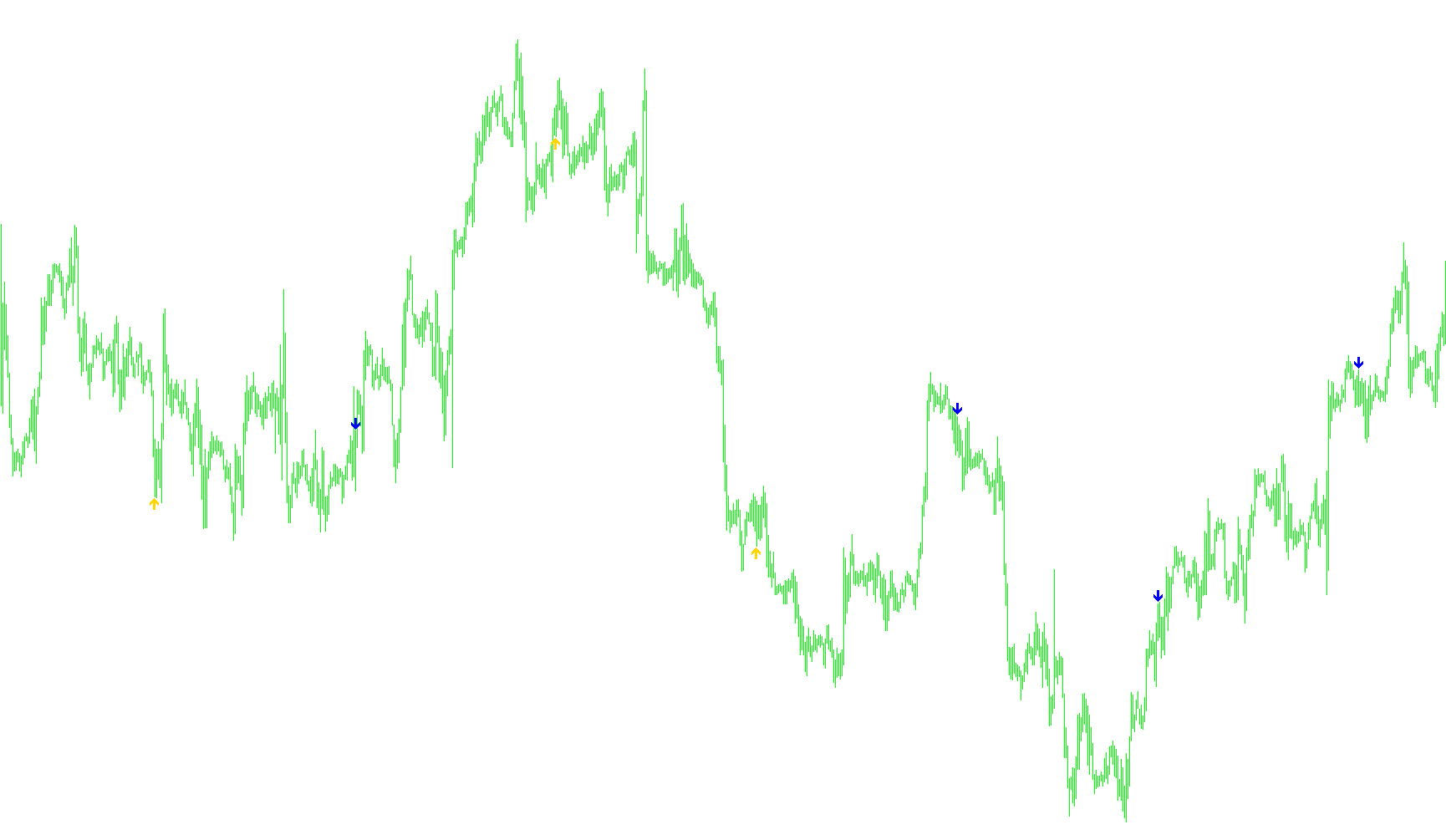
The i-Monday_Sig script is a specialized trading indicator designed to identify specific entry opportunities based on the "Monday System." Instead of using complex moving averages or high-frequency calculations, it focuses on a structured approach to price action occurring at a specific time every week.
Core Logic and Functionality
The primary goal of this tool is to scan your chart history and identify precise moments where a trade signal should occur. It works by looking for three specific conditions that must align simultaneously:
1. The Day of the Week The script specifically filters for Mondays. It ignores all other days of the week, focusing exclusively on the start of the new trading week to capture the specific market behavior associated with this strategy.
2. The Specific Time Window Within those Mondays, the indicator looks for a very specific hour (which can be customized by the user, but defaults to 11:00 AM). It checks for the exact moment when the minutes are at zero, ensuring the signal triggers precisely at the start of that designated hour.
3. Price Relationship (The Signal) Once the script identifies a Monday at the correct hour, it compares two specific price points:
- The Opening Price of the previous day.
- The Closing Price of the current bar.
Depending on how these two prices relate to each other, the script generates one of two visual signals:
- Buy Signal: Triggered if the previous day's opening price was higher than the current closing price.
- Sell Signal: Triggered if the previous day's opening price was lower than the current closing price.
Visual Presentation
To make these signals easy for a trader to see, the script places visual markers (arrows) directly on your chart:
- Buy arrows appear slightly below the price candles.
- Sell arrows appear slightly above the price candles.
The script also features an "intelligent spacing" logic. It automatically adjusts how far away from the candle the arrows are placed based on the timeframe you are viewing (e.g., it places them closer together on 1-minute charts and further apart on daily charts) to ensure they remain clearly visible and do not clutter the screen.
Summary for the User
Essentially, this tool acts as a "map" for the Monday System. It automatically filters through thousands of bars of data to highlight exactly where a potential trade opportunity exists based on the relationship between yesterday's opening price and today's current movement, specifically during the 11:00 AM window on Mondays.
//+------------------------------------------------------------------+
//|                                                 i-Monday_Sig.mq4 |
//|                                           Êèì Èãîðü Â. aka KimIV |
//|                                              http://www.kimiv.ru |
//|                                                                  |
//| 01.12.2005  Ñèãíàëû âõîäîâ è âûõîäîâ ïî ñèñòåìå Ïîíåäåëüíèê.     |
//+------------------------------------------------------------------+
#property copyright "Êèì Èãîðü Â. aka KimIV"
#property link      "http://www.kimiv.ru"

#property indicator_chart_window
#property indicator_buffers 2
#property indicator_color1 LightBlue
#property indicator_color2 Salmon

//------- Âíåøíèå ïàðàìåòðû èíäèêàòîðà -------------------------------
extern int HourOpenPos  = 11;     // Âðåìÿ îòêðûòèÿ ïîêóïêè
extern int NumberOfBars = 10000;  // Êîëè÷åñòâî áàðîâ îáñ÷¸òà (0-âñå)

//------- Ãëîáàëüíûå ïåðåìåííûå --------------------------------------
int ArrowInterval;

//------- Ïîêëþ÷åíèå âíåøíèõ ìîäóëåé ---------------------------------

//------- Áóôåðû èíäèêàòîðà ------------------------------------------
double SigBuy[];
double SigSell[];

//+------------------------------------------------------------------+
//| Custom indicator initialization function                         |
//+------------------------------------------------------------------+
void init() {
  SetIndexBuffer(0, SigBuy);
  SetIndexStyle (0, DRAW_ARROW);
  SetIndexArrow (0, 233);
  SetIndexEmptyValue(0, EMPTY_VALUE);

  SetIndexBuffer(1, SigSell);
  SetIndexStyle (1, DRAW_ARROW);
  SetIndexArrow (1, 234);
  SetIndexEmptyValue(1, EMPTY_VALUE);

  ArrowInterval=GetArrowInterval();
}

//+------------------------------------------------------------------+
//| Custom indicator iteration function                              |
//+------------------------------------------------------------------+
void start() {
  double ms[2];
  int    loopbegin, shift;

 	if (NumberOfBars==0) loopbegin=Bars-1;
  else loopbegin=NumberOfBars-1;

  for (shift=loopbegin; shift>=0; shift--) {
    ms[0]=EMPTY_VALUE;
    ms[1]=EMPTY_VALUE;
    GetSignals(shift, ms);
    SigBuy[shift]=ms[0];
    SigSell[shift]=ms[1];
  }
}

//+------------------------------------------------------------------+
//| Âîçâðàùàåò ñèãíàëû                                               |
//+------------------------------------------------------------------+
void GetSignals(int nb, double& ms[]) {
  int    nsb=iBarShift(NULL, PERIOD_D1, Time[nb]);
  double Op1=iOpen (NULL, PERIOD_D1, nsb+1);
  double Cl1=iClose(NULL, 0, nb+1);

  if (TimeDayOfWeek(Time[nb])==1 && TimeHour(Time[nb])==HourOpenPos && TimeMinute(Time[nb])==0) {
    if (Op1>Cl1) ms[0]=Low[nb]-ArrowInterval*Point;
    if (Op1<Cl1) ms[1]=High[nb]+ArrowInterval*Point;
  }
}

//+------------------------------------------------------------------+
//| Âîçâðàùàåò èíòåðâàë óñòàíîâêè ñèãíàëüíûõ óêàçàòåëåé              |
//+------------------------------------------------------------------+
int GetArrowInterval() {
  int p=Period();

  switch (p) {
    case 1:     return(5);
    case 5:     return(7);
    case 15:    return(10);
    case 30:    return(15);
    case 60:    return(20);
    case 240:   return(30);
    case 1440:  return(80);
    case 10080: return(150);
    case 43200: return(250);
  }
}
//+------------------------------------------------------------------+
Comments