Color_Stochastic
Download script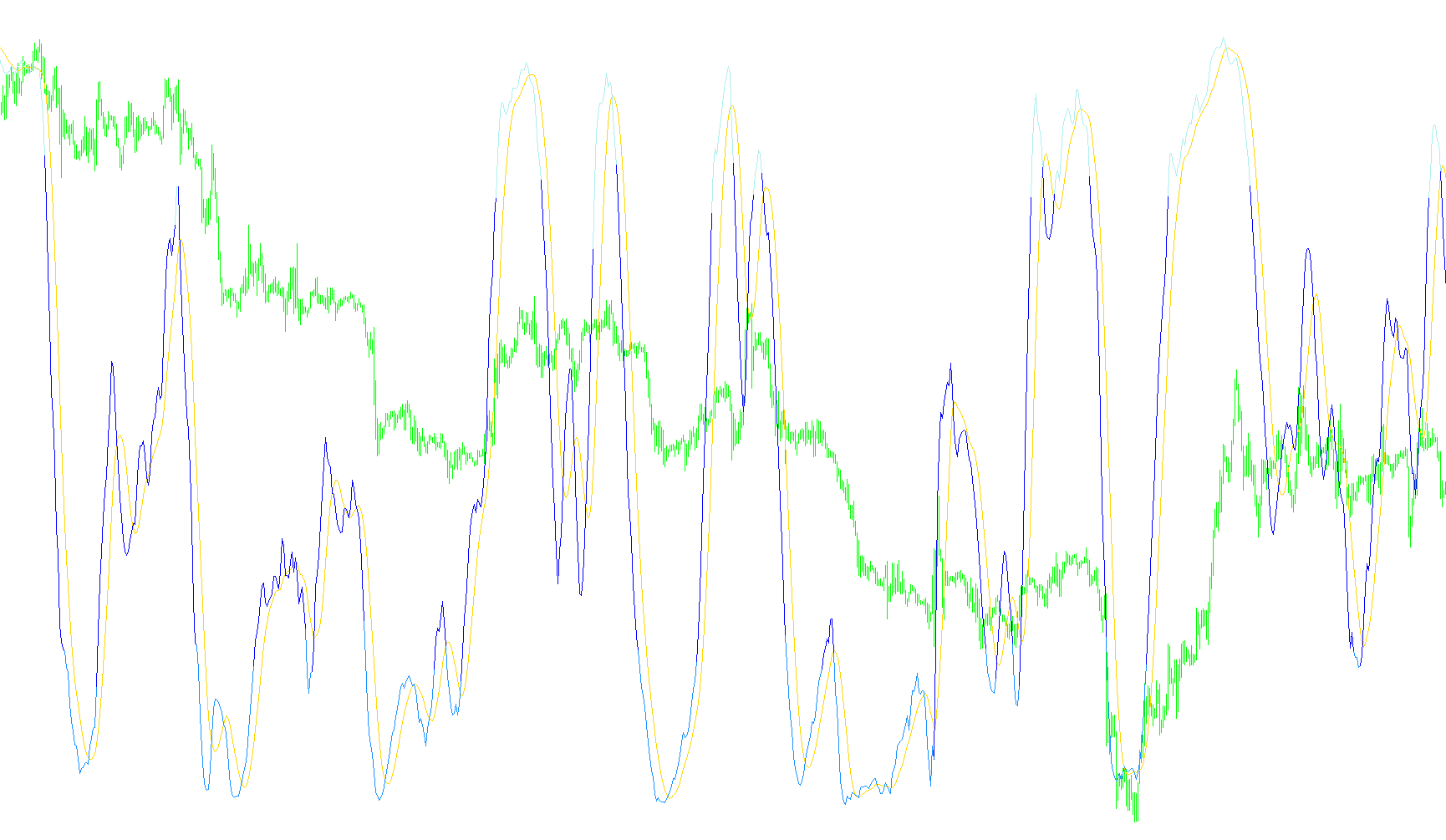
This tool is designed to enhance the visual clarity of the Stochastic Oscillator, a popular technical indicator used by traders to identify potential turning points in market momentum. While a standard Stochastic Oscillator can sometimes become cluttered or difficult to read during periods of intense price movement, this script filters the data to highlight specific conditions—namely "overbought" and "oversold" zones—using a dynamic color-coding logic.
Core Functionality
The indicator operates by calculating two primary lines: a "Fast" line (representing current momentum) and a "Slow" line (serving as a smoothed signal). It allows users to customize several technical variables, including the period of time analyzed, the smoothing method applied to the data, and whether the tool should calculate based on high/low prices or closing prices.
Visual Logic & Alerts
The primary innovation of this script is its automated visual filtering. Rather than showing the full path of the Stochastic lines at all times, it applies a logic-based "visibility" rule:
- Overbought Identification: When the Fast line rises above a user-defined threshold (the "overbought" level), the script highlights that specific data point in a distinct color (Lime). It essentially "flags" the area where the market might be overextended to the upside.
- Oversold Identification: Conversely, when the Fast line drops below a user-defined threshold (the "oversold" level), the script highlights those points in a different color (Red). This signals areas where the market may be stretched to the downside.
- Clean Workspace: When the price action is moving within the "normal" range (between the overbought and oversold levels), the highlighted colors are suppressed. This allows traders to ignore neutral noise and focus exclusively on extreme conditions where a price reversal or trend exhaustion is most likely to occur.
User Experience
For the end-user, this means the chart remains clean and uncluttered. Instead of constantly squinting at two crossing lines, you can instantly see "hot spots" on your screen. The colors act as an immediate visual cue, allowing you to identify potential entry or exit opportunities at a glance without having to manually interpret the raw data of the Stochastic Oscillator.
//+------------------------------------------------------------------+
//|                                             Color Stochastic.mq4 |
//|                                                           mladen |
//|                                                                  |
//+------------------------------------------------------------------+
#property copyright "mladen"
#property link      ""
//----
#property indicator_separate_window
#property indicator_buffers   4
//----
#property indicator_minimum   0
#property indicator_maximum 100
#property indicator_color1 DimGray
#property indicator_style1 STYLE_DOT
#property indicator_color2 DimGray
#property indicator_color3 Lime
#property indicator_color4 Red
#property indicator_width3 2
#property indicator_width4 2
//---- input parameters
//nice setings for trend = 35,10,1
extern string note1="Stochastic settings";
extern int       KPeriod   =30;
extern int       Slowing   =10;
extern int       DPeriod   =10;
extern string note4="0=sma, 1=ema, 2=smma, 3=lwma";
extern int       MAMethod =0;
extern string note5="0=high/low, 1=close/close";
extern int       PriceField= 1;
extern string note6="overbought level";
extern int       overBought=80;
extern string note7="oversold level";
extern int       overSold  =20;
//---- buffers
double KFull[];
double DFull[];
double Upper[];
double Lower[];
//+------------------------------------------------------------------+
//| Custom indicator initialization function                         |
//+------------------------------------------------------------------+
int init()
  {
   SetIndexBuffer(0,DFull);
   SetIndexBuffer(1,KFull);
   SetIndexBuffer(2,Upper);
   SetIndexBuffer(3,Lower);
   SetIndexLabel(1,"Fast");
   SetIndexLabel(2,NULL);
   SetIndexLabel(3,NULL);
//----
   DPeriod=MathMax(DPeriod,1);
     if (DPeriod==1)
     {
      SetIndexStyle(0,DRAW_NONE);
      SetIndexLabel(0,NULL);
     }
     else
     {
      SetIndexStyle(0,DRAW_LINE);
      SetIndexLabel(0,"Slow");
     }
   string shortName="Stochastic ("+KPeriod+","+Slowing+","+DPeriod+","+maDescription(MAMethod)+","+priceDescription(PriceField);
   if (overBought < overSold) overBought=overSold;
   if (overBought < 100)      shortName =shortName+","+overBought;
   if (overSold   >   0)      shortName =shortName+","+overSold;
   IndicatorShortName(shortName+")");
   return(0);
  }
//+------------------------------------------------------------------+
//|                                                                  |
//+------------------------------------------------------------------+
int deinit()
  {
   return(0);
  }
//+------------------------------------------------------------------+
//| Custom indicator iteration function                              |
//+------------------------------------------------------------------+
int start()
  {
   int    counted_bars=IndicatorCounted();
   int    limit;
   int    i;
//----
   if(counted_bars<0) return(-1);
   limit=Bars-counted_bars;
   for(i=limit; i>=0; i--)
     {
      KFull[i]=iStochastic(NULL,0,KPeriod,DPeriod,Slowing,MAMethod,PriceField,MODE_MAIN,i);
      DFull[i]=iStochastic(NULL,0,KPeriod,DPeriod,Slowing,MAMethod,PriceField,MODE_SIGNAL,i);
//----
      if (KFull[i] > overBought) { Upper[i]=KFull[i]; Upper[i+1]=KFull[i+1]; }
        else
        {
         Upper[i]=EMPTY_VALUE;
         if (Upper[i+2]==EMPTY_VALUE)
           Upper[i+1] =EMPTY_VALUE;
        }
      if (KFull[i] < overSold)   { Lower[i]=KFull[i]; Lower[i+1]=KFull[i+1]; }
        else
        {
         Lower[i]=EMPTY_VALUE;
         if (Lower[i+2]==EMPTY_VALUE)
           Lower[i+1] =EMPTY_VALUE;
        }
     }
//----
   return(0);
  }
//+------------------------------------------------------------------+
string priceDescription(int mode)
  {
   string answer;
   switch(mode)
     {
      case 0:  answer="Low/High"   ;break;
      case 1:  answer="Close/Close";break;
      default: answer="Invalid price field requested";
         Alert(answer);
     }
   return(answer);
  }
//+------------------------------------------------------------------+
//|                                                                  |
//+------------------------------------------------------------------+
string maDescription(int mode)
  {
   string answer;
   switch(mode)
     {
      case MODE_SMA:  answer="SMA" ;break;
      case MODE_EMA:  answer="EMA" ;break;
      case MODE_SMMA: answer="SMMA";break;
      case MODE_LWMA: answer="LWMA";break;
      default:        answer="Invalid MA mode requested";
         Alert(answer);
     }
   return(answer);
  }
//+------------------------------------------------------------------+
Comments