BolliTrigger
Download script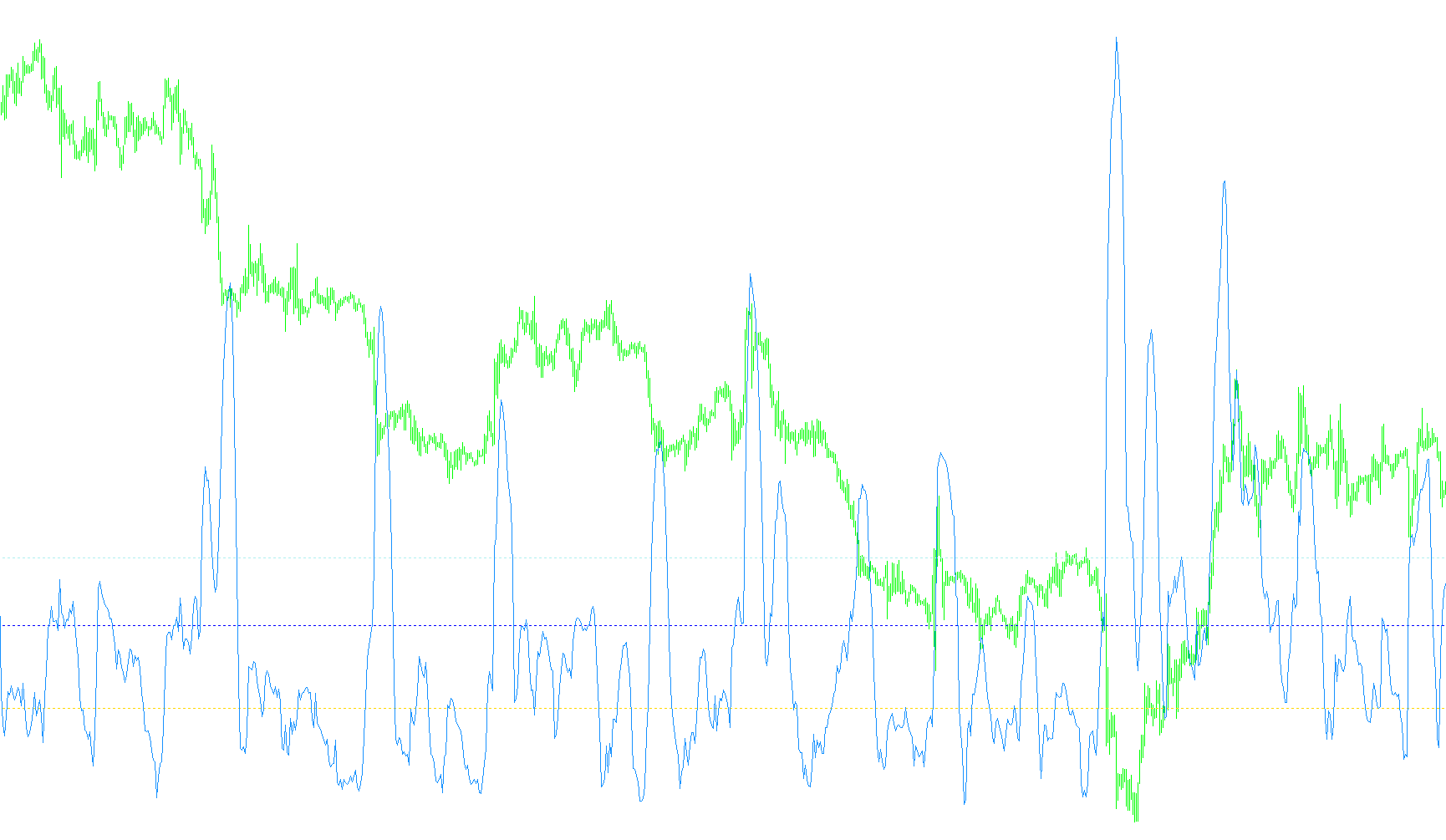
The Bolli Trigger is a specialized technical analysis tool designed to provide traders with a visual signal by combining two distinct mathematical concepts: volatility and relative price positioning. Instead of simply looking at where the price is currently moving, this script calculates how much "tension" exists in the market and translates that into a singular, weighted signal line.
Core Logic Breakdown
The tool operates by analyzing three primary components of the market's behavior:
1. Bollinger Band Analysis The script monitors standard Bollinger Bands to determine two key pieces of information:
- Bandwidth: This measures the relative width of the bands. A widening band indicates increasing volatility, while a narrowing band suggests a period of consolidation or "calm."
- %B (Percentage Bandar): This determines where the current price sits in relation to the upper and lower bands. For example, if the price is at the midpoint, the value is 0.5; if it is pushing against the upper limit, the value moves toward 1.0.
2. The Weighted Signal Calculation The unique "logic" of this script lies in how it fuses these two components together to create a custom signal line. It doesn't just show you the bands; it creates a composite score:
- It takes the Bandwidth (volatility) and multiplies it by a specific constant. A higher constant makes the signal smoother, while a lower one makes it more reactive to sudden market changes.
- It takes the %B value (positional strength) and adjusts it to measure the distance from the midpoint. By applying a second constant to this value, the tool allows for "speed" adjustments—effectively letting the user decide how aggressively the signal should react when the price moves away from the average.
3. Visual Interpretation The final output is displayed as a signal line plotted against three static horizontal reference lines based on Fibonacci ratios:
- Trigger Line (0.236)
- Add Line (0.382)
- Profit Line (0.500)
How it Functions for the User
Rather than looking at multiple complex charts, a user looks at the interaction between the dynamic signal line and these fixed Fibonacci levels. When the weighted calculation (combining volatility and price position) moves significantly across these levels, it serves as a visual cue to identify potential momentum shifts or overextended market conditions. Essentially, it simplifies complex "volatility + position" math into a single moving line that helps traders spot high-probability areas of interest.
//+------------------------------------------------------------------+
//|                                           BolliTrigger.mq4       |
//|                      Copyright © 2005, DragonBonz Software       |
//|                                        http://www.metaquotes.net |
//+------------------------------------------------------------------+
#property copyright "Copyright © 2005, DragonBonz Software"
//#property link      "http://www.metaquotes.net"

#property indicator_separate_window
#property indicator_buffers 4
#property indicator_color1 Red
#property indicator_color2 Blue
#property indicator_color3 Blue
#property indicator_color4 Green

extern int     BollBandMovAvgPrd=13;
extern int     BollBandMovAvgShift=0;
extern int     BollBandMovAvgMethod=0;
extern double  BollBandStdDev=2.0;
//
// set default values of horizonatal lines to Fib ratios
//
extern double  TriggerLine    = 0.236;
extern double  AddLine        = 0.382;
extern double  ProfitLine     = 0.5;
//
// Trigger weights for bandwidth and %B
//
extern int     Bandwidth_Const = 110;
extern int     PercentB_Const = 13;

double  bbBandWidth;

//---- buffers
double ExtMapBuffer1[];
double ExtMapBuffer2[];
double ExtMapBuffer3[];
double ExtMapBuffer4[];
//+------------------------------------------------------------------+
//| Custom indicator initialization function                         |
//+------------------------------------------------------------------+
int init()
  {
//---- additional buffers are used for counting
   IndicatorBuffers(5);
//---- indicators
   SetIndexStyle(0,DRAW_LINE,STYLE_DOT);
   SetIndexBuffer(0,ExtMapBuffer1);
   SetIndexStyle(1,DRAW_LINE,STYLE_DOT);
   SetIndexBuffer(1,ExtMapBuffer2);
   SetIndexStyle(2,DRAW_LINE,STYLE_DOT);
   SetIndexBuffer(2,ExtMapBuffer3);
   SetIndexStyle(3,DRAW_LINE);
   SetIndexBuffer(3,ExtMapBuffer4);

   SetIndexDrawBegin( 2, BollBandMovAvgPrd );

   IndicatorShortName("Bolli Trigger");
//----
   return(0);
  }
//+------------------------------------------------------------------+
//| Custor indicator deinitialization function                       |
//+------------------------------------------------------------------+
int deinit()
  {
//----

//----
   return(0);
  }
//+------------------------------------------------------------------+
//| Custom indicator iteration function                              |
//+------------------------------------------------------------------+
int start()
  {
   int limit;
   int    counted_bars=IndicatorCounted();
//---- check for possible errors
   if(counted_bars<0) return(-1);
//---- last counted bar will be recounted
   if(counted_bars>0) counted_bars--;
   limit=Bars-counted_bars;
//----

   for(int i=0; i < limit; i++)
   {
      //
      // calculate Bollinger Moving Average and upper and lower bands
      //
      double ma     = iMA(NULL,0,BollBandMovAvgPrd,BollBandMovAvgShift,BollBandMovAvgMethod,PRICE_CLOSE,i);
      double up     = iBands( NULL,0,BollBandMovAvgPrd,BollBandStdDev,0,PRICE_CLOSE,MODE_UPPER,i);
	   double low    = iBands( NULL,0,BollBandMovAvgPrd,BollBandStdDev,0,PRICE_CLOSE,MODE_LOWER,i);

	   double r = up - low; // range
	   double perB  	= 0;  // default value for %B

	   if( r > 0 )
	     perB = (Close[i] - low)/r;

	   if( ma > 0 )
	     bbBandWidth = r/ma;
	   else
	     bbBandWidth = 0;

      ExtMapBuffer1[i]  = TriggerLine;
	   ExtMapBuffer2[i] 	= AddLine;
	   ExtMapBuffer3[i] 	= ProfitLine;
      //
      // signal line
      //
      // this line is the weighted sum of bandwidth and a modified %B
      //
      // bandwidth gives us a relative size of bollinger bands.
      //    Increasing Bandwidth_Const will smooth out signal, decreasing Bandwidth_Const makes
      //    it more volatile
      //
      // %B gives us a value of 1.0 at upperband, 0.5 at middle( moving avg ), and  0.0 at lower band
      //    we take the absolute value of 0.5 - %B to get a value that ranges from 0 to 1.0+
      //    this gives us a boost as bolli bands expand and can be used to speed or slow down
      //    the trigger by decreasing PercentB_Const to speed up( since it on bottom, it gives a
      //    greater weight when decreased), or increase PercentB_Const to slow down
      ExtMapBuffer4[i] =  ( bbBandWidth*Bandwidth_Const ) +  MathAbs((0.5-perB)/PercentB_Const);

   }

//----
   return(0);
  }
//+------------------------------------------------------------------+
Comments