BatFink Trend Change Indicator
Download script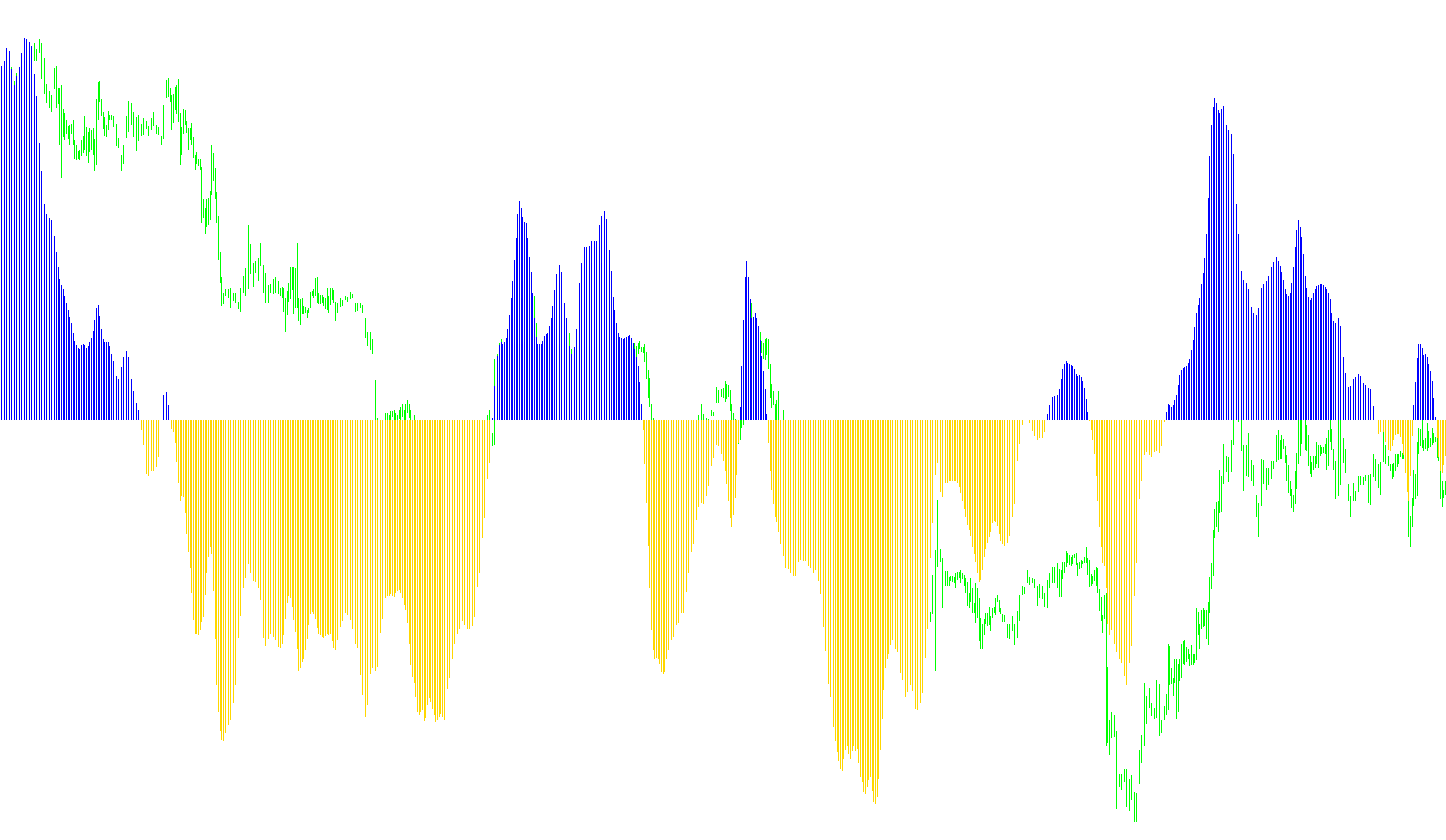
The BatFink Trend Change Indicator is designed to help traders visualize and identify shifts in market momentum by analyzing price action over a specific lookback period. Rather than just showing raw price movements, it processes historical data to create a smoothed trend signal that helps filter out "market noise."
How the Logic Works
1. Data Analysis and Range Calculation
The tool begins by looking at a set number of past candles (the "period," which defaults to 100). Within this window, it identifies the highest price reached (High) and the lowest price recorded (Low). By comparing the current candle's midpoint against these extremes, the indicator determines where the price is currently sitting relative to its recent history.
2. Smoothing and Normalization
To prevent the indicator from jumping erratically with every small price tick, the script uses a mathematical smoothing process. It calculates a value based on the price position and blends it with the previous calculation. This creates a fluid transition between values. The result is then compressed into a specific range to ensure the trend line remains stable and readable.
3. Trend Identification (The "Up" and "Down" Logic)
The core of the indicator lies in how it interprets these smoothed values:
- Trend Detection: The logic constantly checks if the indicator's value has crossed the zero line. A move from positive to negative (or vice versa) signals a potential change in market direction.
- Visual Separation: The tool separates these trends into two distinct visual states. When the trend is bullish (upward), it highlights that movement; when the trend turns bearish (downward), it switches the visual representation, making it easy for the user to see which way the "momentum" is leaning at a glance.
4. Automated Alerts
Beyond just providing a visual chart, the script includes an automated notification system. When the logic detects a definitive turn in the trend—shifting from an upward move to a downward move (or vice versa)—it is programmed to automatically send an email notification. This allows traders to receive real-time updates on trend changes without having to watch the charts constantly.
Summary for the User
In simple terms, this indicator looks at a large chunk of recent history to see where the price is currently "trending." It smooths out the tiny ups and downs of the market to show you the bigger picture. When the overall momentum flips from positive to negative (or vice versa), it changes color on your screen and sends you an email, helping you identify potential entry or exit points based on trend shifts.
//+------------------------------------------------------------------+
//|                               BatFink Trend Change Indicator.mq4 |
//|                                                       Mark Jupp. |
//|                                        http://www.metaquotes.net |
//+------------------------------------------------------------------+

#property copyright "Mark Jupp."
#property link      "http://www.metaquotes.net"

#property indicator_separate_window
#property indicator_buffers 2
#property  indicator_color1 Blue
#property indicator_color2 OrangeRed

extern int period=100;
extern bool YesClose=true;

int candle;

//---- buffers

double ExtMapBuffer1[];
double ExtMapBuffer2[];
double ExtMapBuffer3[];

//+------------------------------------------------------------------+
//| Custom indicator initialization function                         |
//+------------------------------------------------------------------+

int upOn=0;

int init()
  {
//---- indicators

   SetIndexStyle(0,DRAW_HISTOGRAM);
   SetIndexBuffer(0,ExtMapBuffer1);
   SetIndexStyle(1,DRAW_HISTOGRAM);
   SetIndexBuffer(1,ExtMapBuffer2);
   SetIndexStyle(2,DRAW_HISTOGRAM);
   SetIndexBuffer(2,ExtMapBuffer3);
   IndicatorDigits(Digits+1);

//+------------------------------------------------------------------+
//| Indicator Description - 100 period trend change                  |
//+------------------------------------------------------------------+

   IndicatorShortName("BatFink Trend Change Indicator");
   SetIndexLabel(1,NULL);
   SetIndexLabel(2,NULL);
   return(0);
  }

//+------------------------------------------------------------------+
//| Custom indicator iteration function                              |
//+------------------------------------------------------------------+

   int start()
  {

   int    limit;
   int    counted_bars=IndicatorCounted();
   double prev,current,old;
   double Value=0,Value1=0,Value2=0,BatFink=0,BatFink1=0,BatFink2=0;
   double price;
   double MinL=0;
   double MaxH=0;
   if (YesClose==true){candle=1;}else{candle=0;}

   if(counted_bars>0) counted_bars--;
   limit=Bars-counted_bars;

   for(int i=0; i<limit; i++)
    {  MaxH = High[Highest(NULL,0,MODE_HIGH,period,i)];
       MinL = Low[Lowest(NULL,0,MODE_LOW,period,i)];
         price = (High[i]+Low[i])/2;
            Value = 0.33*2*((price-MinL)/(MaxH-MinL)-0.5) + 0.67*Value1;
            Value=MathMin(MathMax(Value,-0.999),0.999);
      ExtMapBuffer1[i]=0.5*MathLog((1+Value)/(1-Value))+0.5*BatFink1;
      Value1=Value;
      BatFink1=ExtMapBuffer1[i];
    }

   bool up=true;
   //bool upOn;
   for(i=limit-2; i>=0; i--)
     {
      current=ExtMapBuffer1[i];
      prev=ExtMapBuffer1[i+1];

      if (((current<0)&&(prev>0))||(current<0))   up= false;
      if (((current>0)&&(prev<0))||(current>0))   up= true;

      if(!up)
        {
         ExtMapBuffer1[i]=current;
        if ((upOn!=1)&&(i==1)){SendMail("BatFink Turned Down on " + Symbol(),"");
         upOn=1;}

         ExtMapBuffer2[i]=0.0;
        }

       else
         {

          ExtMapBuffer2[i]=current;
          if ((upOn!=2)&&(i==1)){SendMail("BatFink Turned Up on " + Symbol(),"");
          upOn=2;}
          ExtMapBuffer3[i]=0.0;
         }
     }

   return(0);
  }

//+------------------------------------------------------------------+
Comments